Whatnot Fee Calculator
Type the price, shipping, tax and your costs. You get the Whatnot commission and payment processing fee, your payout and your profit; the commission rate is yours to edit.
Recent
Your last 10 settings, saved only in this browser. Nothing is uploaded.
How to use the Whatnot Fee Calculator
- Type the price the buyer pays for the item into “Item price ($)”.
- Put the postage the buyer pays in “Shipping the buyer pays ($)”. If you do not charge shipping, enter 0.
- Fill in the postage you pay in “Your shipping cost ($)”.
- Record what you paid for the item in “Item cost ($)”.
- Expand More options to change the defaults if needed. Those fields are “Sales tax collected ($)”, “Other costs per order ($)”, “Number of orders”, “Commission (%)”, “Processing fee (%)”, and “Processing fee, fixed ($)”.
- Check the results. “Profit per order” and “Platform pays out” are the two main figures. Below them, the rows show the commission, the payment processing fee, total fees, margin, ROI, effective fee rate, break-even price, and “Profit for all orders”.
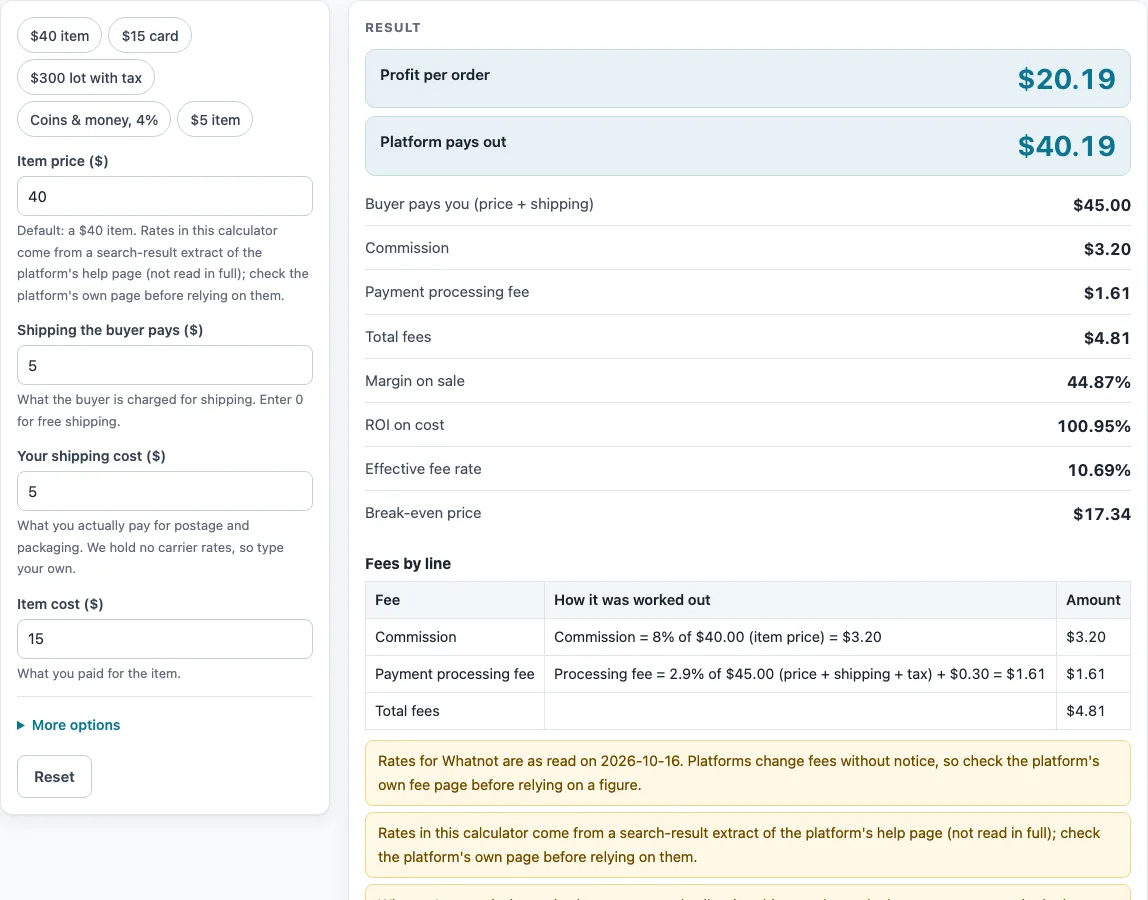
- For a quick test, click one of the presets: ‘$40 item’, ‘$15 card’, ‘$300 lot with tax’, ‘Coins & money, 4%’, or ‘$5 item’.
Out of the box, the Whatnot Fee Calculator uses an item price of $40, buyer-paid shipping of $5, your shipping cost of $5, an item cost of $15, no tax, and 1 order. An error appears when the price is not above zero, when an amount or rate is negative, when a rate is above 100%, or when the number of orders falls outside 1 to 100.
How does the Whatnot Fee Calculator work out fees and profit?
The tool applies two fees to each sale. Both rates come from a search-result extract of Whatnot’s help page, not from reading the full page. A percentage of the item price becomes the commission, while the payment processing fee is 2.9% plus $0.30 on the item price, the shipping, and the sales tax. With the defaults, the commission is $3.20 (8% of $40). Processing works out to 45.00 × 2.9% + 0.30 = $1.61, so total fees come to $4.81.
Your payout equals what the buyer pays you for the item and shipping, minus those fees. Sales tax raises the processing base, but it is not counted as revenue or payout. Subtract your item cost and shipping cost from the payout to get profit. In the defaults, the payout is $40.19 and the profit is $20.19. Dividing that profit by the $45 the buyer pays for the item and shipping gives the margin of 44.87%.
Take the example of a $300 lot with $8 shipping and $24 tax. Commission comes to $24.00, processing is $9.93, and total fees reach $33.93. Payout lands at $274.07, and with a cost of $180 and postage of $8, profit reaches $86.07. Notably, the $24 tax never shows up in the payout.
Why can the Whatnot commission rate differ from 8%?
An 8% rate is the default, and the extract lists it as the base rate for trading cards and sports. Tiered commission, which varies by category and sales volume, is also described in the extract. Only one editable rate is available, so the tool cannot be exact for every seller. Set “Commission (%)” to the rate that applies to your account and category. Choosing the preset ‘Coins & money, 4%’ drops the commission to 4% per the extract, which on a $200 item gives a different result from the default.
The tool also assumes that the commission is charged on the item price only. That is not stated in the extract, so it is our assumption; confirm it on Whatnot’s own page. Those rates were read on 2026-10-16 and could have changed since.
The results show two warnings. Losses are flagged when profit falls below zero, and a warning appears when total fees exceed 40% of the sale. Break-even price is the item price where profit hits zero for your inputs, showing how far a sale sits from a loss.
Sources (checked 16 October 2026): help.whatnot.com · help.whatnot.com
Worked examples
| Input | Result |
|---|---|
| Whatnot: item price $40.00, item cost $15.00 | Fees $4.81, payout $40.19, profit $20.19 (44.87% margin) |
| Whatnot: item price $15.00, item cost $5.00 | Fees $2.05, payout $16.95, profit $7.95 (41.84% margin) |
| Whatnot: item price $300.00, item cost $180.00 | Fees $33.93, payout $274.07, profit $86.07 (27.94% margin) |
| Whatnot: item price $200.00, item cost $120.00 | Fees $14.25, payout $190.75, profit $65.75 (32.07% margin) |
Calculated by the tool above; open it with the same values to see each step.
Frequently asked questions
Is the Whatnot commission always 8%?
No. 8% is the default, taken from the extract for trading cards and sports. Category and seller tier both shift the commission, so type the rate that fits your account into “Commission (%)”.
Does sales tax count as money I keep?
No. Adding to “Sales tax collected ($)” increases the base for the processing fee, yet it is not counted as revenue or payout. Nothing in the results adds it to what you keep.
Where do the rates in this calculator come from?
Rates here are taken from a search-result extract of the platform’s help page, which was never read in full. They were read on 2026-10-16 and may have changed since. Confirm them on the platform’s own page before relying on them.
What is the break-even price?
This is the item price where profit hits zero after costs and fees. Pricing under it means a sale loses money with the current inputs.
Is anything I type uploaded?
No. Everything happens in your browser, so nothing you type gets uploaded. Sign-up is not needed.
What do the presets change?
Applying a preset loads a sample sale into the controls, such as ‘$40 item’ or ‘$300 lot with tax’. The ‘Coins & money, 4%’ option sets commission to 4% as well. Any value stays editable once the preset is applied.
Related tools
- Marketplace Fee and Profit Calculators: a good pick if you want every fee calculator on this site in one list.
- Depop Fee Calculator: helpful if you also sell on Depop.
- Poshmark Fee Calculator: for sellers who also list on Poshmark.
- Reverb Fee Calculator: a fit when Reverb is another channel for your items.
- Selling Price Calculator: work backward from the profit you want to find the price to list at.
- Marketplace Fee Calculator: compare fees across several marketplaces side by side.
- eBay Fee Calculator: estimates what eBay will charge on a single sale.
- eBay Profit Calculator: shows how much you keep after fees from an eBay sale.