Stripe Fee Calculator
Enter a payment to see the Stripe fee and what you keep, or the amount you want to keep to see what to charge.
Recent
Your last 10 settings, saved only in this browser. Nothing is uploaded.
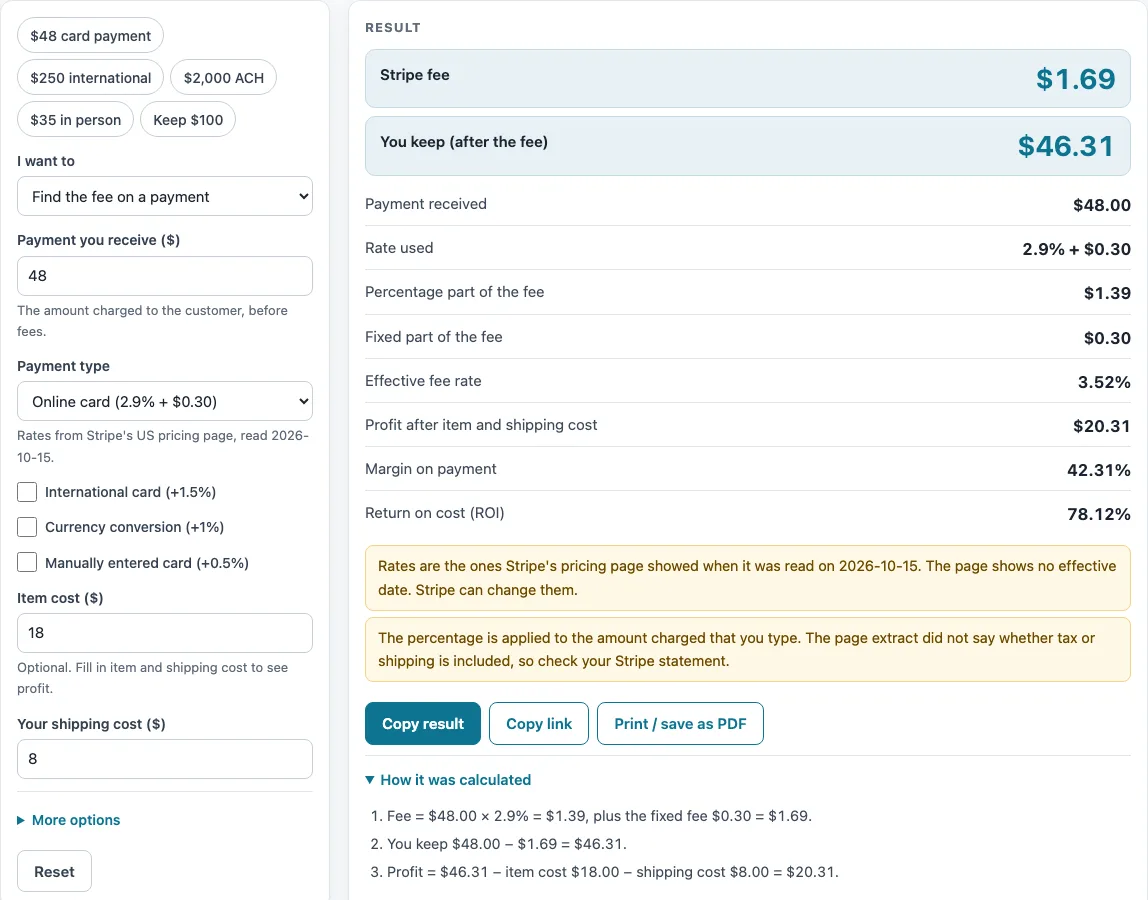
How to use the Stripe Fee Calculator
- Under “I want to”, choose “Find the fee on a payment” to see the fee on a payment you type, or “Find what to charge to keep a set amount” to enter the amount you want to keep and see the smallest charge that leaves it.
- Pick the “Payment type”: Online card (2.9% + $0.30, the default), Stripe Terminal in person (2.7% + $0.05), or ACH Direct Debit (0.8%, capped at $5).
- Tick the extras that apply: “International card (+1.5%)”, “Currency conversion (+1%)” or, for online cards only, “Manually entered card (+0.5%)”. They are hidden for ACH.
- Type “Payment you receive ($)”. The default is $48. When you want to keep a set amount, type “Amount you want to keep ($)” instead.
- Optional: type “Item cost ($)” (default $18) and “Your shipping cost ($)” (default $8). The page then shows profit, margin and ROI.
- Read the results: the fee, what you keep, the rate used, the percentage part, the fixed part and the effective fee rate. When you want to keep a set amount, read “Amount to charge” and its fee.
- If you have your own rates, open “More options” and type a number into “Percentage fee override (%)” or “Fixed fee override ($)”. The rate table is replaced, and a warning says your numbers are used. “Number of payments” is there too.
- Read any warning above the results, then compare the figures with your Stripe statement.
The presets are “$48 card payment”, “$250 international”, “$2,000 ACH”, “$35 in person” and “Keep $100”. Each one loads a common case.
How are Stripe fees calculated?
Stripe fees are a percentage of the payment plus a fixed amount, and the result is rounded to the cent. The published rates are 2.9% plus $0.30 for online card payments, 2.7% plus $0.05 for Stripe Terminal, and 0.8% with no fixed fee for ACH Direct Debit, where the percentage part is capped at $5.00.
The formula is: fee = payment × percentage (rounded to the cent) + fixed fee. Extras are added to the percentage, not to the fixed fee. Stripe’s pricing page lists three extras: +1.5% for international cards, +1% for currency conversion, and +0.5% for manually entered cards. The calculator adds them to the percentage for online cards. For Terminal it offers the first two, not manual entry, and it does not add any of them to ACH.
Take the default $48 online card payment. 2.9% of $48 is $1.392, which is shown as $1.39. Adding $0.30 gives a fee of $1.69, so you keep $46.31. With an $18 item cost and an $8 shipping cost, profit is $20.31. The fee is 3.52% of the payment, which is the effective fee rate.
A $250 payment with the international and currency conversion extras is 5.4% (2.9 + 1.5 + 1). The percentage part is $13.50, and with the $0.30 fixed fee the total is $13.80. An ACH payment of $2,000 would be 0.8%, or $16.00, but the cap limits the percentage part to $5.00.
Results are calculated from your inputs and the rates published on Stripe’s US pricing page, read on 2026-10-15. That page shows no effective date, and Stripe can change its rates, so check the page before you price a sale. Tap to Pay, dispute fees, and Billing, Connect and Radar are not included. The Terminal international extra of +1.5% shown on that page is applied through the same international box.
How do you work out the charge needed to keep a set amount?
To find the charge needed to keep a set amount by online card, divide the amount plus $0.30 by 1 minus 0.029, then round to the cent. The calculator then picks the smallest charge whose payment minus fee is at least the amount you want to keep.
To keep $100 by card, the charge is $103.30, with a fee of $3.30. A charge of $103.29 has the same $3.30 fee, but it leaves $99.99, one cent short. For ACH, keeping $2,000 needs a charge of $2,005.00, because the $5.00 cap means the fee is $5.00 and not the $16.04 that 0.8% would give.
What does the effective fee rate show?
The effective fee rate is the total fee divided by the payment, shown as one percentage. The fixed fee weighs more on small payments. On the default $48 card payment it is 3.52%, because the $0.30 fixed fee adds to the 2.9% part. The page also shows the percentage part and the fixed part separately, so you can see which of the two drives the fee.
Sources (checked 16 October 2026): stripe.com
Worked examples
| Input | Result |
|---|---|
| payment of $48.00, Online card (2.9% + $0.30) | fee $1.69, you keep $46.31 |
| payment of $250.00, Online card (2.9% + $0.30) | fee $13.80, you keep $236.20 |
| keep $100.00, Online card (2.9% + $0.30) | charge $103.30, fee $3.30, you keep $100.00 |
| payment of $2,000.00, ACH Direct Debit (0.8%, capped at $5) | fee $5.00, you keep $1,995.00 |
| payment of $35.00, Stripe Terminal in person (2.7% + $0.05) | fee $1.00, you keep $34.00 |
Calculated by the tool above; open it with the same values to see each step.
Frequently asked questions
Does the calculator include tax or shipping in the fee?
The percentage is applied to the amount you type. This page does not say how tax or shipping is treated, so the tool shows a warning to check your Stripe statement.
Why does ACH show a $5.00 fee on a large payment?
ACH Direct Debit is 0.8%, but the percentage part is capped at $5.00, and there is no fixed fee. A $2,000 ACH payment would be $16.00 at 0.8%, so the calculator shows $5.00.
Are the rates up to date?
The rates were read from Stripe’s US pricing page on 2026-10-15. That page shows no effective date, and Stripe can change its rates, so check the pricing page for current figures.
Can I use my own rates?
Yes. Type a number into “Percentage fee override (%)” or “Fixed fee override ($)”, and it replaces the table. A warning says your numbers are used.
Does it cover Tap to Pay or dispute fees?
No. Tap to Pay, dispute fees, and Billing, Connect and Radar are not included. Other Stripe products are not included either, and Stripe can change its rates.
What does the effective fee rate mean?
It is the total fee divided by the payment amount, shown as one percentage. For the default $48 card payment, the $1.69 fee gives an effective rate of 3.52%.
Related tools
- Marketplace Fee and Profit Calculators: use it to browse every fee and profit calculator on this site.
- PayPal Fee Calculator: use it to see the fee on a payment received through PayPal.
- Shopify Fee Calculator: use it when you take payments through your own Shopify store and want the plan cost per order.
- Marketplace Fee Calculator: use it to see the same sale on several marketplaces, with Stripe in a separate payment services table.
- eBay Fee Calculator: use it to estimate the fees on an eBay listing.
- eBay Profit Calculator: use it to see what you keep after costs on eBay.
- Amazon Referral Fee Calculator: use it to estimate the referral fee on an Amazon sale.
- Mercari Fee Calculator: use it to estimate the fees on a Mercari sale.