Shopify Fee Calculator
Pick your plan, order total and orders per month to see payment fees, plan cost per order and profit.
Recent
Your last 10 settings, saved only in this browser. Nothing is uploaded.
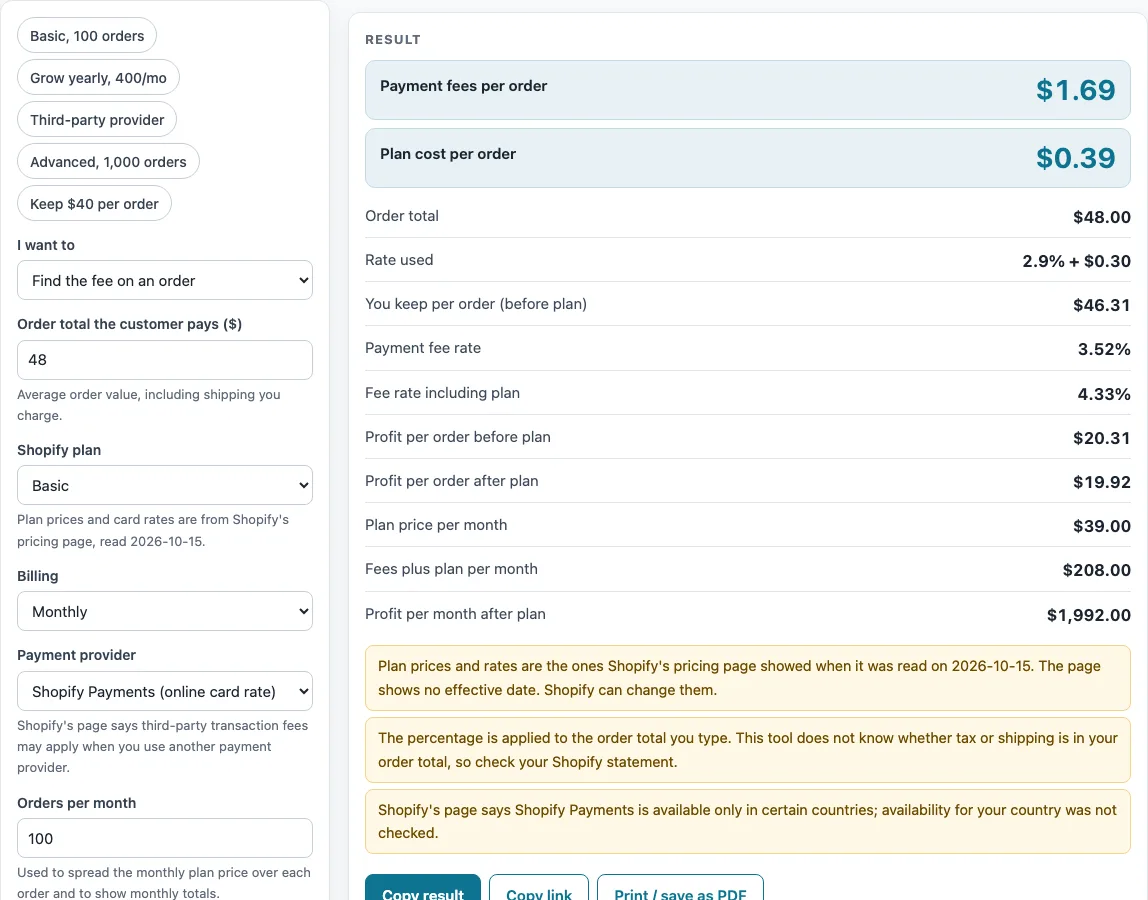
How to use the Shopify Fee Calculator
- Under “I want to”, choose “Find the fee on an order” to see the payment fees and plan cost per order, or “Find what to charge to keep a set amount” to find the order total that leaves a set amount per order.
- Pick a preset or set your plan manually. Choose Basic, Grow, Advanced or Plus under “Shopify plan”, and Monthly or Yearly under “Billing”.
- Under “Payment provider”, choose “Shopify Payments (online card rate)” or the third-party option.
- Type “Order total the customer pays ($)”. The default is $48.
- Type “Orders per month”. The default is 100.
- Type “Item cost ($)” and “Your shipping cost ($)”. The defaults are $18 and $8. With costs typed, the tool adds profit per order before and after the plan, and profit per month.
- For a third-party provider, open “More options” and type “Provider’s percentage fee (%)” and “Provider’s fixed fee ($)” from the provider’s own pricing. “Percentage fee override (%)” replaces the card rate or Shopify’s third-party fee, and “Fixed card fee override ($)” replaces the $0.30 fee.
- Read the results, including “Payment fee rate” and “Fee rate including plan”.
- To work backwards, type “Amount you want to keep per order ($)”, before the plan, and read the smallest order total that reaches it.
The presets are “Basic, 100 orders”, “Grow yearly, 400/mo”, “Third-party provider”, “Advanced, 1,000 orders” and “Keep $40 per order”. You can change any value afterwards.
How much does Shopify charge per order?
With Shopify Payments, the payment fee is your order total multiplied by the online card rate for your plan, plus a fixed $0.30. The card rates are Basic 2.9%, Grow 2.7%, Advanced 2.5% and Plus 2.25%, and the percentage part is rounded to the cent.
How is the Shopify payment fee worked out?
Use this formula: payment fee = order total × card rate + $0.30. For the default $48 order on the Basic plan, 2.9% of $48 is $1.392, which is shown as $1.39. Add $0.30 and the fee is $1.69.
What does a Shopify plan cost per order?
Plan cost per order is the monthly plan price divided by your orders per month, rounded to the cent. Basic costs $39 monthly or $29 a month billed yearly. Grow costs $105 monthly or $79 a month billed yearly. Advanced costs $399 monthly or $299 a month billed yearly. Plus starts at $2,300 a month. No yearly Plus price was read, so the tool uses the monthly price. At 100 orders a month, the Basic plan costs $39 ÷ 100 = $0.39 per order.
How do third-party payment provider fees add up?
With a third-party provider, the fee is: order total × (Shopify’s third-party fee + the provider’s percentage) + the provider’s fixed fee. Shopify’s third-party fee is 2% on Basic, 1% on Grow, 0.6% on Advanced and 0.2% on Plus. The provider’s own percentage and fixed fee are not on Shopify’s page, so you type them in. For example, if a provider charges 2.9% + $0.30 and you are on the Basic plan, the fee on $48 is (2% + 2.9%) = 4.9%, which is $2.35, plus $0.30, a total of $2.65.
How do you work out profit per order and per month?
Profit per order before the plan is the order total minus the payment fee, the item cost and the shipping cost. With the defaults, $48 − $1.69 − $18 − $8 = $20.31. Subtract the plan cost per order to get profit per order after the plan: $20.31 − $0.39 = $19.92. For the month, profit after the plan is profit per order before the plan × orders − plan price. At 100 orders, that is $20.31 × 100 − $39 = $1,992.00.
How do you find the order total needed to keep a set amount?
Keep mode finds the smallest order total, to the cent, where the total minus the payment fee is at least the amount you want to keep. For example, to keep $40 per order on Shopify Payments with the Basic plan, you would charge $41.50. The fee on $41.50 is $1.20 + $0.30 = $1.50, and $41.50 − $1.50 = $40.00.
Why can an order that makes money before the plan lose money after it?
Plan cost per order is subtracted from each order’s profit. If your profit per order before the plan is small, a high plan cost per order, which happens at low order volumes, can turn it negative. The tool shows the loss after the plan as a warning.
Sources (checked 16 October 2026): shopify.com
Worked examples
| Input | Result |
|---|---|
| order of $48.00, Basic plan, 100 orders a month | payment fee $1.69, plan $0.39 per order |
| order of $75.00, Grow plan, 400 orders a month | payment fee $2.33, plan $0.20 per order |
| order of $48.00, Basic plan, 100 orders a month | payment fee $2.65, plan $0.39 per order |
| keep $40.00 per order, Basic plan, 100 orders a month | charge $41.50, payment fee $1.50, plan $0.39 per order |
| order of $120.00, Advanced plan, 1000 orders a month | payment fee $3.30, plan $0.30 per order |
Calculated by the tool above; open it with the same values to see each step.
Frequently asked questions
Is the Shopify Fee Calculator free, and do I need to sign up?
Yes, it is free and needs no sign-up. Everything runs in your browser, and nothing you type is uploaded.
Are the Shopify rates up to date?
The rates were read from Shopify’s page on 2026-10-15. Check Shopify’s own pricing page before you rely on them, because rates can change.
Does the tool confirm that Shopify Payments is available in my country?
No. Shopify Payments is available only in certain countries, and the tool does not check your country. Confirm availability on Shopify’s site.
Why do I have to type in third-party provider fees?
The provider’s percentage and fixed fee are not on Shopify’s page, so the tool cannot know them. Enter the rates from your provider’s own pricing, and the tool will add them to Shopify’s third-party fee.
Why is the Plus price shown as “starts at” $2,300?
Shopify’s page gives Plus as a starting price of $2,300 a month. No yearly Plus price was read, so the tool uses the monthly price for Plus.
Can I change the card rate or the $0.30 fixed fee?
Yes. Type a value in “Percentage fee override (%)” to replace the card rate or Shopify’s third-party fee. Type a value in “Fixed card fee override ($)” to replace the $0.30 fixed fee.
Related tools
- Marketplace Fee and Profit Calculators: use it to browse every fee and profit calculator on this site.
- Stripe Fee Calculator: use it to see the fee on a card payment taken through Stripe.
- PayPal Fee Calculator: use it to see the fee on a payment received through PayPal.
- Marketplace Fee Calculator: use it to see the same sale on several marketplaces, with Shopify Payments in a separate payment services table.
- eBay Fee Calculator: use it to work out eBay selling fees on a listing.
- eBay Profit Calculator: use it to see what you keep from an eBay sale after costs.
- Amazon Referral Fee Calculator: use it to estimate Amazon referral fees on a sale.
- Amazon FBA Profit Calculator: use it to estimate profit on products sold through Amazon FBA.
- Depop Fee Calculator: use it to work out Depop fees on a sale.