Selling Price Calculator
Enter your costs and the profit or margin you want. Pick a platform's fees or type your own percent and fixed fee to get the price to list.
Recent
Your last 10 settings, saved only in this browser. Nothing is uploaded.
How to use the Selling Price Calculator
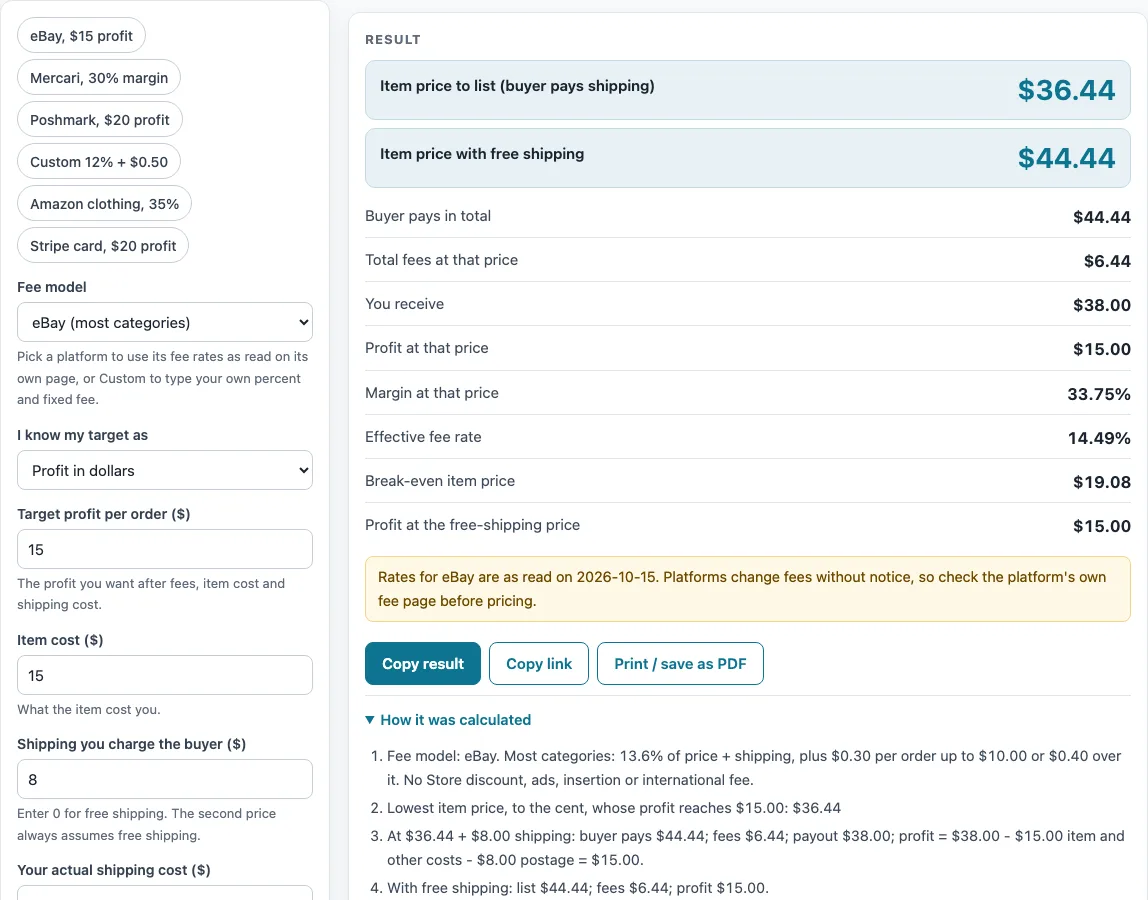
- Pick a platform from the list. eBay (most categories) is the default. Presets are also available: eBay $15 profit, Mercari 30% margin, Poshmark $20 profit, Custom 12% + $0.50, Amazon clothing 35% margin or Stripe card $20 profit.
- Select the goal. Profit mode asks for the dollar amount you want to keep. Margin mode asks for a percent of the total the buyer pays, and the percent must be under 100.
- Type in your target profit or target margin.
- Add your item cost, meaning what the item costs you.
- Give the shipping you charge the buyer, plus your postage, which is what you pay to send the item.
- Input any other costs per sale. The default is $0.
- If you chose the Custom model, put in the percent fee and the fixed fee per order. Tick “Percent fee also applies to shipping” only when the platform takes its percent on the shipping the buyer pays as well as the item price.
- Look at “Item price to list (buyer pays shipping)”. If you charge shipping, also check “Item price with free shipping”.
- Review “Buyer pays in total”, “Total fees”, “You receive”, “Profit”, “Margin”, “Effective fee rate”, “Break-even item price” and “Profit at the free-shipping price”.
- A message in place of results means the calculation has stopped, so check your target, costs and fee values.
Choosing a preset sets the platform and target at once, and any field can be edited afterward.
How does a selling price calculator work?
A selling price calculator starts from the profit or margin you want and works backward to the item price. People also call it a reverse fee calculator, since the fee is worked out backward from your target. Its search lands on the lowest price, to the cent, that still reaches your target after fees, item cost, shipping and other costs. Bisection, which narrows the range of possible prices by halving it over and over, drives the search, and each candidate price is checked with the same fee function as the platform’s fee calculator on this site.
How are marketplace fees calculated in this tool?
Under the Custom model, a simple formula applies: fee equals a percent of the sale plus a fixed fee per order, rounded to the cent. If “Percent fee also applies to shipping” is ticked, the percent is taken on the item price plus the shipping the buyer pays. Leave it unticked and the percent covers the item price only. Each platform model runs that same function using its own rates. Results come from your inputs and the rates posted on the platform’s page as of the date shown. Depop, Whatnot and Reverb rates are drawn only from search-result extracts of those help pages, not from the full pages, so check each platform’s own page before relying on them. Rates change.
What is the difference between profit and margin?
Profit means the dollars that remain once fees, item cost, other costs and your postage come out of what the buyer pays. Profit mode guarantees this figure is at least the dollar amount you enter. Margin expresses profit as a percent of the total paid by the buyer, meaning the item price plus the shipping they pay. Margin mode keeps profit at or above the percent you enter of that total.
What does break-even item price mean?
Break-even item price is the lowest price at which profit reaches $0, based on the same shipping and costs you entered. Anything above that level covers all your costs on the sale. This figure helps you judge how far a price can drop, such as during a sale, before each item starts losing money.
Sources (checked 16 October 2026): ebay.com · sell.amazon.com · mercari.com · poshmark.com · depop.com · help.whatnot.com · help.reverb.com · paypal.com · stripe.com · shopify.com
Worked examples
| Input | Result |
|---|---|
| eBay, target profit $15.00, item cost $15.00, shipping charged $8.00 | List at $36.44 for a profit of $15.00 |
| Mercari, target margin 30%, item cost $15.00, shipping charged $8.00 | List at $30.33 for a profit of $11.50 |
| Poshmark, target profit $20.00, item cost $10.00, shipping charged $0.00 | List at $37.50 for a profit of $20.00 |
| Custom percent + fixed fee, target profit $10.00, item cost $20.00, shipping charged $8.00 | List at $35.75 for a profit of $10.00 |
| Amazon (referral fee only), target margin 35%, item cost $6.00, shipping charged $0.00 | List at $10.67 for a profit of $3.74 |
Calculated by the tool above; open it with the same values to see each step.
Frequently asked questions
Why does the result sometimes show more than one price that works?
Poshmark’s fee falls from a percentage to a flat amount below $15. Near $15, the answer is the lowest price that reaches your target, which is not necessarily the only one.
Are Depop, Whatnot and Reverb rates confirmed?
No. Those rates are taken only from search-result extracts of each platform’s help page, not from reading the full page. The tool repeats this in a warning when one of them is chosen, so check the platform’s own page before you rely on the result. Rates change.
Does the tool include Amazon FBA costs?
No. There are no FBA costs in the Amazon model. The Amazon model uses the Professional plan at 100 items a month and the Toys and Games rate or the category you choose.
Are payment service fees included?
The page shows a payment-service note for PayPal, Stripe and Shopify. The Shopify monthly plan price is not included in the results.
Why did my calculation stop with a message?
The tool stops and shows a message when no price up to $100,000 reaches your target, for example when a margin is higher than the fees allow. It also stops for a blank target, a negative cost, a margin of 100 or more, a custom fee of 100% or more, or an unknown category.
Is my data sent anywhere?
No. The tool runs in your browser, and nothing you enter is uploaded.
Related tools
- Marketplace Fee and Profit Calculators: every fee calculator on this site, gathered in one list.
- eBay Price Calculator: a listing price worked out specifically for eBay.
- eBay Fee Calculator: the fees on an eBay sale, shown at whatever price you enter.
- eBay Profit Calculator: what you keep after eBay fees and costs, at a price of your choosing.
- Marketplace Fee Calculator: fees from several platforms lined up side by side.
- Amazon Referral Fee Calculator: if you sell on Amazon, the referral fee.
- Amazon FBA Profit Calculator: adds the FBA costs this tool leaves out, for Amazon sellers.
- Mercari Fee Calculator: just the Mercari fee, nothing else.
- Poshmark Fee Calculator: Poshmark’s fee by itself.
- Depop Fee Calculator: Depop’s fee, though its rates come from search-result extracts, so check them.