Reverb Fee Calculator
Type the price, shipping, tax and your costs. You get the Reverb selling fee, the payments fee, your payout and your profit; every rate is editable.
Recent
Your last 10 settings, saved only in this browser. Nothing is uploaded.
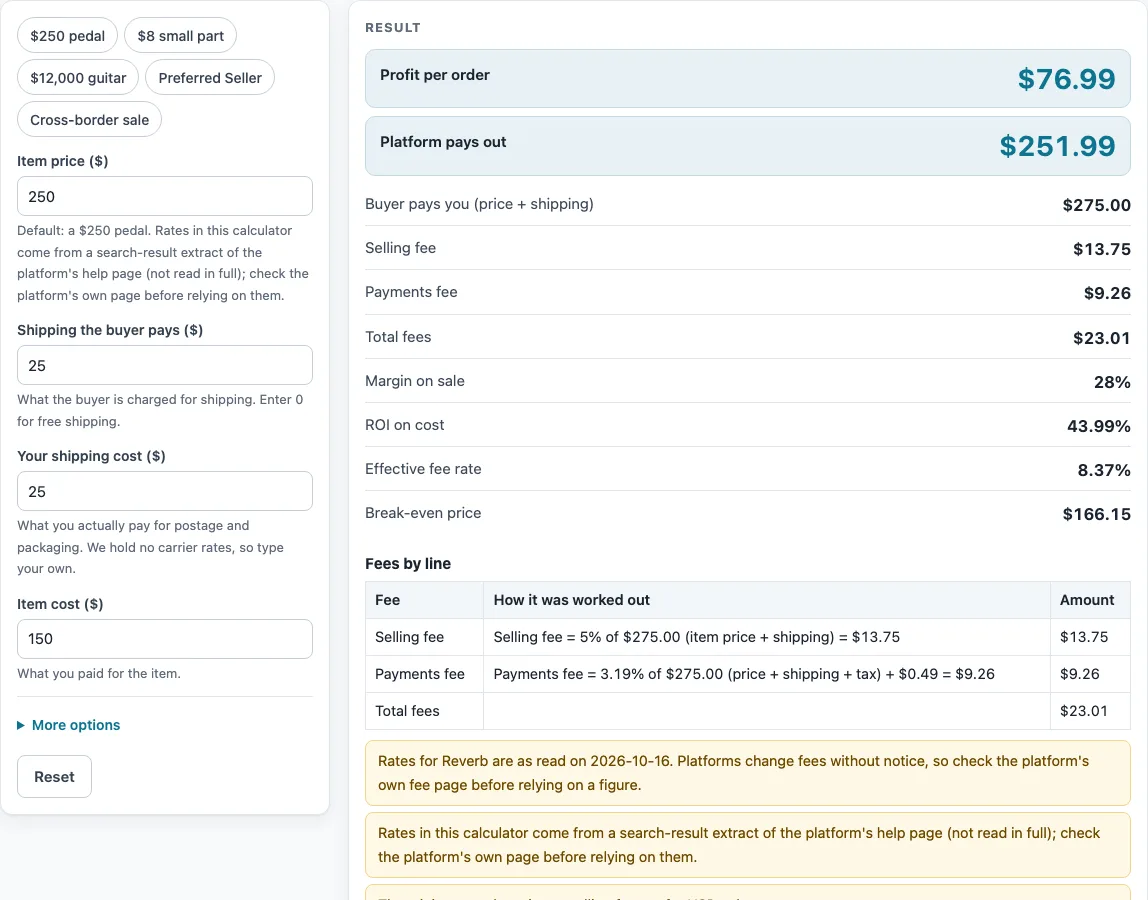
How to use the Reverb fee calculator
- Type the price the buyer pays for the item into “Item price ($)”, before any shipping.
- Enter what the buyer pays for postage in “Shipping the buyer pays ($)”. Use 0 if you do not charge shipping.
- Enter what you pay the carrier in “Your shipping cost ($)”.
- Enter what you paid for the item in “Item cost ($)”. This is what the profit figure is based on.
- Open “More options” if you need extra fields. Enter “Sales tax collected ($)”, “Other costs per order ($)” and “Number of orders” when they apply.
- Check the fee rates in “Selling fee (%)”, “Selling fee minimum ($)”, “Selling fee maximum ($)”, “Payments fee (%)”, “Payments fee, fixed ($)” and “Cross-border fee (%)”. Compare them with Reverb’s own page.
- Read the results: “Profit per order”, “Platform pays out”, “Buyer pays you (price + shipping)”, “Total fees”, “Margin on sale”, “ROI on cost”, “Effective fee rate”, “Break-even price” and “Profit for all orders”.
- If the selling fee was limited by the minimum or maximum, the step line under the result says so.
The page includes presets for a pedal, a small part, a guitar, “Preferred Seller” and “Cross-border sale”. Choose one to fill in the fields, then change any number you need. Each preset is a starting point, not a rule.
How does Reverb calculate its selling fee?
Reverb’s selling fee is 5% of the item price plus shipping. All of Reverb’s rates here come from search-result extracts of its help pages, which were not read in full, so check Reverb’s own pages before you rely on them. On USD sales, the fee has a $0.50 minimum and a $500 maximum. The calculator applies the percentage first, then keeps the result between those two limits. A very cheap item can therefore pay more than 5%, and a very expensive one can pay less.
What does the payments fee apply to?
The payments fee is 3.19% plus $0.49, charged on the item price, the shipping you charge and any sales tax. The calculator treats that total as the base. If you pick the “Preferred Seller” preset, the rate changes to 2.99% plus $0.49. That figure comes from an extract of a separate Reverb article, so confirm it on Reverb’s page.
When does the cross-border fee apply?
Reverb lists a cross-border fee of +1%, and the extract says it excludes the EEA. In this calculator, “Cross-border fee (%)” starts at 0, so nothing is added unless you enter a rate or pick the “Cross-border sale” preset. The page charges this fee on the payments base. That base is an assumption made by this calculator, not a rule quoted from Reverb, so check it against Reverb’s page. The row “Cross-border fee” only appears when the value is above 0.
How is profit worked out?
Profit per order is the buyer’s payment, meaning item price plus shipping, minus the selling fee, the payments fee, any cross-border fee, your shipping cost, your item cost and any other costs per order. Sales tax you collect is passed on rather than kept, so it is not counted as income in the profit line. Margin on sale is profit divided by the amount the buyer pays you. ROI on cost is profit divided by your item cost.
What is a break-even price?
The break-even price is the lowest item price at which a sale covers its fees and costs with no profit left over. The calculator works it out from your costs and the fee rates on the page. Pricing below that point means the sale loses money, and the page shows a loss warning in that case.
Why does the fee rate sometimes look higher than the listed rate?
The “Effective fee rate” output divides the total fees by the amount the buyer pays you. Fixed amounts, such as the $0.49 payments fee and the minimum selling fee, make up a larger share of small sales. This is why the effective rate can be well above the percentage rates shown in the fee controls.
Sources (checked 16 October 2026): help.reverb.com · reverb.com · help.reverb.com
Worked examples
| Input | Result |
|---|---|
| Reverb: item price $250.00, item cost $150.00 | Fees $23.01, payout $251.99, profit $76.99 (28% margin) |
| Reverb: item price $8.00, item cost $3.00 | Fees $1.55, payout $11.45, profit $3.45 (26.54% margin) |
| Reverb: item price $12,000.00, item cost $9,000.00 | Fees $883.29, payout $11,116.71, profit $1,996.71 (16.64% margin) |
| Reverb: item price $250.00, item cost $150.00 | Fees $22.46, payout $252.54, profit $77.54 (28.2% margin) |
Calculated by the tool above; open it with the same values to see each step.
Frequently asked questions
Is this Reverb fee calculator free to use?
Yes. It runs in your browser, is free, and needs no sign-up. Nothing you enter is uploaded.
Are the Reverb rates on this page up to date?
The rates come from a search-result extract of Reverb’s help page, which was not read in full, and were read on 2026-10-16. Rates change, so they may differ now. Check Reverb’s own page before you rely on any figure.
Why does the selling fee not equal 5%?
Reverb’s selling fee has a minimum of $0.50 and a maximum of $500 on USD sales. When the 5% result falls outside those limits, the calculator uses the limit instead, and the step line says so.
Does the payments fee include sales tax?
Yes. The payments fee is calculated on the item price, the shipping you charge and any sales tax you enter in “Sales tax collected ($)”.
What does the “Preferred Seller” preset change?
It changes the payments fee rate to 2.99% plus $0.49. Everything else stays as you entered it, so you can compare the result with the standard rate.
Why does the page show a warning?
The page shows a warning when a sale results in a loss or when total fees are above 40% of the sale. Warnings also appear when the rates you entered differ from the defaults, or when the cross-border base is in use.
Related tools
- Marketplace Fee and Profit Calculators: use when you want every fee calculator on this site in one list.
- Whatnot Fee Calculator: use when you also sell on Whatnot.
- Depop Fee Calculator: use when you also sell on Depop.
- Selling Price Calculator: use when you know the profit you want and need the price to list at.
- Marketplace Fee Calculator: use when you want to compare fees across several marketplaces side by side.
- eBay Fee Calculator: use when you want to estimate eBay fees for the same item.
- eBay Profit Calculator: use when you want the profit on an eBay sale after fees and costs.
- eBay Shipping Calculator: use when you want to estimate shipping costs for a heavy item such as a guitar.