Poshmark Fee Calculator
Type the sale price, any shipping and your item cost. You get the Poshmark fee ($2.95 flat under $15, 20% from $15), your payout and your profit.
Recent
Your last 10 settings, saved only in this browser. Nothing is uploaded.
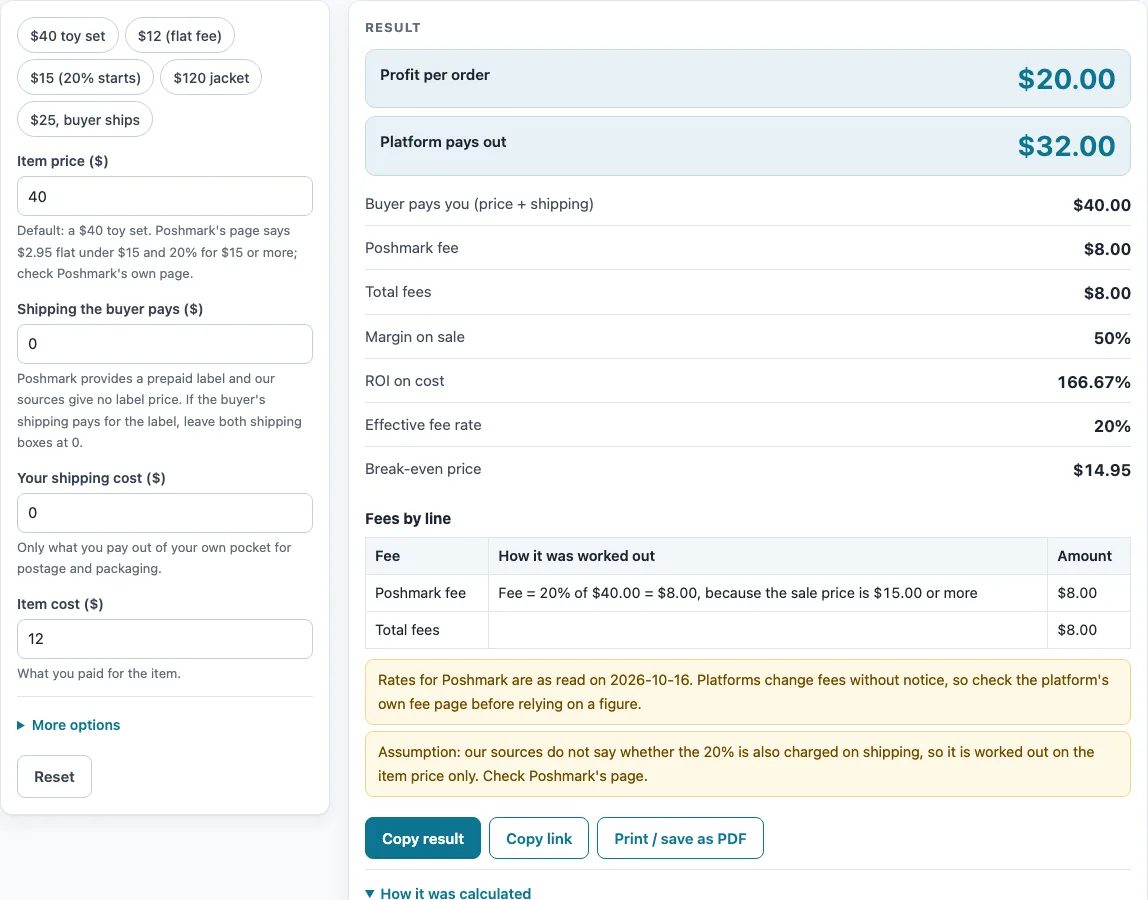
How to use the Poshmark fee calculator
- Type the price buyers will see in “Item price ($)”. The page starts at $40.
- Enter what the buyer pays for shipping in “Shipping the buyer pays ($)”. This starts at 0.
- Enter what you pay to ship in “Your shipping cost ($)”. This also starts at 0, because Poshmark provides a prepaid label and no price for it is given here, so type the amount you actually spend.
- Enter what you paid for the item in “Item cost ($)”. The page starts at $12.
- Leave “Number of orders” at 1, or change it if you want to see the totals for several identical sales.
- Open “More options” only if you need to change “Other costs per order ($)”.
- Check the three rate boxes under “More options”, “Flat fee under the limit ($)”, “Flat fee applies below ($)” and “Rate at or above the limit (%)”, against your own account. They start at 2.95, 15 and 20. If yours differ, change them, and a warning will list the change.
- Read “Platform pays out” and “Profit per order”. Then check “Break-even price” and any warning above the results.
You can also click a preset: “$40 toy set”, “$12 (flat fee)”, “$15 (20% starts)”, “$120 jacket” or “$25, buyer ships”. Each one fills in the boxes for a common case so you can see how the numbers change.
How does the Poshmark fee calculator work out the fee?
The page uses two rules from Poshmark’s page. For a sale under $15, the fee is a flat $2.95. For a sale of $15 or more, the fee is 20% of the listing price. The calculator applies the flat fee when the price is below the limit of 15, and the 20% applies at exactly $15.
The price in the fee rule is the item price. The page charges the 20% on the item price only. Poshmark’s page, as read here, does not say whether shipping is included in that 20%, so the page shows a warning about this assumption. Check the rule before you rely on the figure for sales where the buyer pays shipping.
Poshmark pays the card processing fees, so the calculator has no processing fee line. There is no listing fee either. The only seller fee the page works out is the one from the rule above. Shipping is not built in either: Poshmark’s page says it provides a prepaid label, but the price is not in the sources used here, so you type your own shipping cost and anything the buyer pays.
The rule creates a small jump at $15. A $14.99 sale pays the flat $2.95, but a $15.00 sale pays 20%, which is $3.00. At $15 the payout is slightly lower than at $14.99.
How are profit, margin, ROI and break-even price worked out?
The page first finds the payout, which is the buyer’s payment minus the fee. Profit is the payout minus your item cost and your shipping cost. Margin on sale is the profit divided by the item price, and ROI on cost is the profit divided by the item cost. Effective fee rate is the fee divided by the item price.
With the default inputs, a $40 item gives a fee of $8.00 (20% of $40), a payout of $32.00, and a profit of $20.00 after the $12 cost. That is a margin on sale of 50% and an ROI on cost of 166.67%. The break-even price is $14.95. This is the price at which the payout just covers the $12 cost. Because $14.95 is under the $15 limit, the flat $2.95 applies: $14.95 minus $2.95 is $12.00.
A second example: a $12 item with a $3 cost pays the flat $2.95. The payout is $9.05 and the profit is $6.05. The effective fee rate is 24.58%, which is $2.95 divided by $12. This shows why the flat fee matters more on low-priced items.
Rates change, and the page’s rate boxes exist for that reason. If your account shows different numbers, type them in and the profit figures follow, with a warning that lists what you changed.
Sources (checked 16 October 2026): poshmark.com · support.poshmark.com
Worked examples
| Input | Result |
|---|---|
| Poshmark: item price $40.00, item cost $12.00 | Fees $8.00, payout $32.00, profit $20.00 (50% margin) |
| Poshmark: item price $12.00, item cost $3.00 | Fees $2.95, payout $9.05, profit $6.05 (50.42% margin) |
| Poshmark: item price $15.00, item cost $5.00 | Fees $3.00, payout $12.00, profit $7.00 (46.67% margin) |
| Poshmark: item price $120.00, item cost $45.00 | Fees $24.00, payout $104.00, profit $51.00 (39.84% margin) |
Calculated by the tool above; open it with the same values to see each step.
Frequently asked questions
Does Poshmark charge a listing fee or a card processing fee?
Poshmark’s page, as read here, says there is no listing fee and that Poshmark pays the card processing fees. So the calculator has no listing fee or processing fee line. The only seller fee it works out is the flat $2.95 or the 20%.
Why does a $15 sale pay a little less than a $14.99 sale?
A $14.99 sale pays the flat $2.95, but a $15.00 sale pays 20%, which is $3.00. The payout at $15 is therefore slightly lower. The rule changes at the limit, and the calculator follows it.
Does the 20% fee include the shipping the buyer pays?
The page charges the 20% on the item price only. The sources do not say whether shipping is included, so the page shows a warning about this assumption. Check Poshmark’s own page for the wording before you rely on a figure that includes shipping.
What if my account’s fee rates are different from the ones shown?
Change the three rate boxes under “More options” to match your account. When the rates differ from the defaults, a warning lists the change, so you can see which numbers you altered. The results then use your figures.
How current are the rates on the page?
The rates were read directly from Poshmark’s page on 2026-10-15, and rates change, so they may differ by the time you read this. A second Poshmark support article was seen only as a search-result extract, because the page itself returned an error. Check Poshmark’s own pages before you make a pricing decision. The calculator only uses the numbers you type or the defaults.
Why does the page warn me about a loss or a high fee?
The page shows a warning when a sale loses money per order, when fees are above 40% of the sale, or when the flat fee is larger than the item price. Each warning points to a number you can change, such as the item price or the item cost. The warnings do not change the results.
Related tools
- Marketplace Fee and Profit Calculators: use when you want every fee calculator on this site in one list.
- Mercari Fee Calculator: use when you also sell on Mercari.
- Depop Fee Calculator: use when you also sell on Depop and want to check the fee on one sale.
- Whatnot Fee Calculator: use when you also sell on Whatnot.
- Selling Price Calculator: use when you know the profit you want and need the price to list at.
- Marketplace Fee Calculator: use when you want to compare fees across more than one marketplace.
- eBay Fee Calculator: use when you want to check the fees on an eBay sale.
- eBay Profit Calculator: use when you want your profit after costs on an eBay sale.