Mercari Fee Calculator
Type the item price, the shipping the buyer pays and your own costs. You get the Mercari selling fee, the payout, your profit and the break-even price.
Recent
Your last 10 settings, saved only in this browser. Nothing is uploaded.
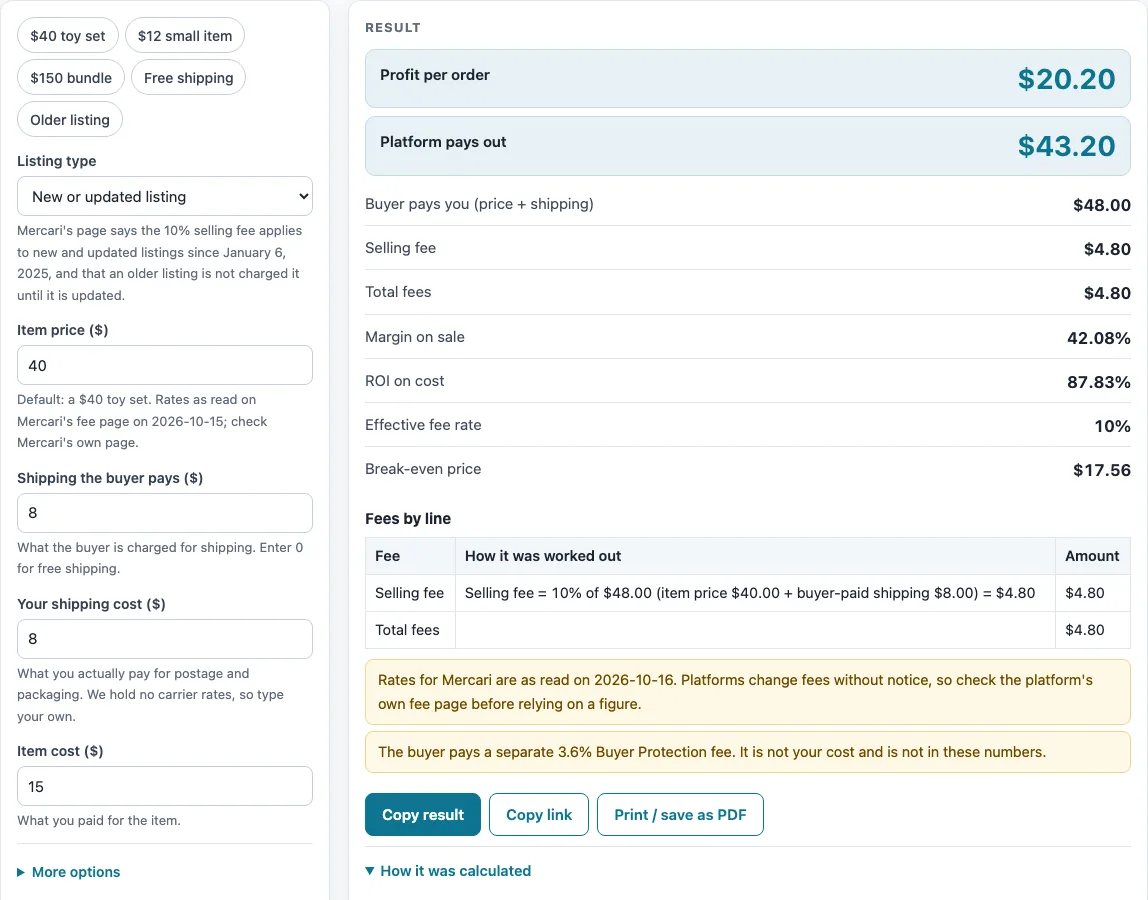
How to use the Mercari fee calculator
- Choose “Listing type”. “New or updated listing” is the default. Choose “Older listing, not updated” if the listing has not been updated.
- Enter “Item price ($)”. The default is $40.
- Enter “Shipping the buyer pays ($)”. The default is $8.
- Enter “Your shipping cost ($)”. The default is $8.
- Enter “Item cost ($)”. The default is $15.
- Read “Profit per order” and “Platform pays out”, the two large figures.
- Check the detail rows: “Buyer pays you (price + shipping)”, “Selling fee”, “Processing fee” (older listings only), “Total fees”, “Margin on sale”, “ROI on cost”, “Effective fee rate” and “Break-even price”.
- Set “Number of orders” from 1 to 100 to see “Profit for all orders”.
- Open More options to enter “Other costs per order ($)”. The three rate boxes are “Selling fee (%)”, “Processing fee (%)” and “Processing fee, fixed ($)”. Leave them blank to use the rate for your listing type, or type a number to override it. A warning then lists the rates you changed.
Presets fill the form for common cases: ‘$40 toy set’, ‘$12 small item’, ‘$150 bundle’, ‘Free shipping’ and ‘Older listing’. Pick one, then change the numbers to match your own sale. Item price must be a number above zero, costs and rates cannot be negative, rates cannot exceed 100%, and “Number of orders” must be between 1 and 100.
How is Mercari’s seller fee worked out?
For a new or updated listing, the selling fee is 10% of the item price plus the shipping the buyer pays. There is no separate payment processing fee, according to Mercari help article 169, which was read on 2026-10-15. For an older listing that has not been updated, there is no selling fee. Instead the fee is $0.50 plus 2.9% of the transaction price. This page applies that to the item price plus buyer-paid shipping, which is our reading of “transaction price”.
Your profit is then the buyer’s total minus the fee, minus your item cost and your own shipping cost. Using the defaults, the buyer pays $48.00 ($40 plus $8 shipping). The selling fee is $4.80, so the platform pays out $43.20. Subtract the $15 item cost and the $8 shipping, and profit is $20.20.
What do the output rows and warnings mean?
“Margin on sale” is profit divided by the item price plus shipping, so $20.20 divided by $48.00 gives 42.08%. “ROI on cost” is profit divided by your item cost, your shipping and any other costs. With the defaults that is $20.20 divided by $23.00, or 87.83%. “Effective fee rate” shows the total fees as a share of what the buyer pays.
“Break-even price” is the lowest price, in whole cents, at which profit is $0 or more, with the same shipping and costs. Each fee line is rounded to the cent before the totals are added.
For an older listing at the defaults, the processing fee is $1.89 (48.00 × 2.9% + 0.50 = 1.892, rounded). The payout becomes $46.11 and profit becomes $23.11.
The calculator does not include the buyer’s separate 3.6% Buyer Protection fee, which the buyer pays, and a warning reminds you of this. The rates were read on 2026-10-16, so they may have changed. A warning also appears when you lose money on an order, when total fees exceed 40% of what the buyer pays, and when you change a rate.
What does the calculator leave out?
Mercari’s shipping label prices are not built into the page, so you type your own shipping cost. The cancelation fee that Mercari lists for frequent cancelers (5% of the item price, up to $25) is also left out. According to Mercari’s fee-change article, the flat 10% selling fee applies to new and updated listings from January 6, 2025. That article also says a selling fee is not applied to an older listing until it is updated, which is why the “Older listing, not updated” choice exists.
If your own account shows a different rate, type it into “Selling fee (%)”, “Processing fee (%)” or “Processing fee, fixed ($)” and the profit figures follow. Mercari changes its fees from time to time, so read the current help article before you rely on a result.
Sources (checked 16 October 2026): mercari.com · mercari.com
Worked examples
| Input | Result |
|---|---|
| Mercari: item price $40.00, item cost $15.00 | Fees $4.80, payout $43.20, profit $20.20 (42.08% margin) |
| Mercari: item price $12.00, item cost $3.00 | Fees $1.70, payout $15.30, profit $7.30 (42.94% margin) |
| Mercari: item price $40.00, item cost $15.00 | Fees $1.89, payout $46.11, profit $23.11 (48.15% margin) |
| Mercari: item price $150.00, item cost $60.00 | Fees $15.00, payout $135.00, profit $63.00 (42% margin) |
Calculated by the tool above; open it with the same values to see each step.
Frequently asked questions
Does this Mercari fee calculator use the rates Mercari currently charges?
It calculates from the rates you see on the page, which default to the rate for your listing type. Those rates were read on 2026-10-16 and may have changed. Check Mercari’s own help pages before you rely on a figure.
Is the Buyer Protection fee included in the results?
No. The buyer’s separate 3.6% Buyer Protection fee is not part of the numbers. A warning on the page says so.
Why does my older listing show a processing fee when a new one does not?
For an older listing that has not been updated, the fee is $0.50 plus 2.9% of the transaction price, and there is no selling fee. For a new or updated listing, the fee is 10% of the price plus buyer-paid shipping, with no separate processing fee.
What does a loss per order warning mean?
It means your profit for one order is below zero after fees, shipping and costs. Check the “Item cost ($)” and “Your shipping cost ($)” fields, and compare the “Break-even price” row.
Can I use my own fee rates?
Yes. Type a number into “Selling fee (%)”, “Processing fee (%)” or “Processing fee, fixed ($)” under More options. The warning then lists which rates you changed.
Is anything I enter sent to a server?
No. The calculator runs in your browser, nothing is uploaded, and you do not need to sign up.
Related tools
- Marketplace Fee and Profit Calculators: use when you want every fee calculator on this site in one list.
- Poshmark Fee Calculator: use when you also sell on Poshmark.
- Depop Fee Calculator: use when you also sell on Depop.
- Selling Price Calculator: use when you know the profit you want and need the price to list at.
- Marketplace Fee Calculator: use when you want to compare fees across several marketplaces side by side.
- eBay Fee Calculator: use when you also list on eBay.
- eBay Profit Calculator: use when you want your profit after costs on an eBay sale.
- Amazon Referral Fee Calculator: use when you also sell on Amazon and want the referral fee.