Marketplace Fee Calculator
Type one price, the shipping and your costs. You get fees, payout and profit on each marketplace, sorted by profit, with the rates behind each row.
Recent
Your last 10 settings, saved only in this browser. Nothing is uploaded.
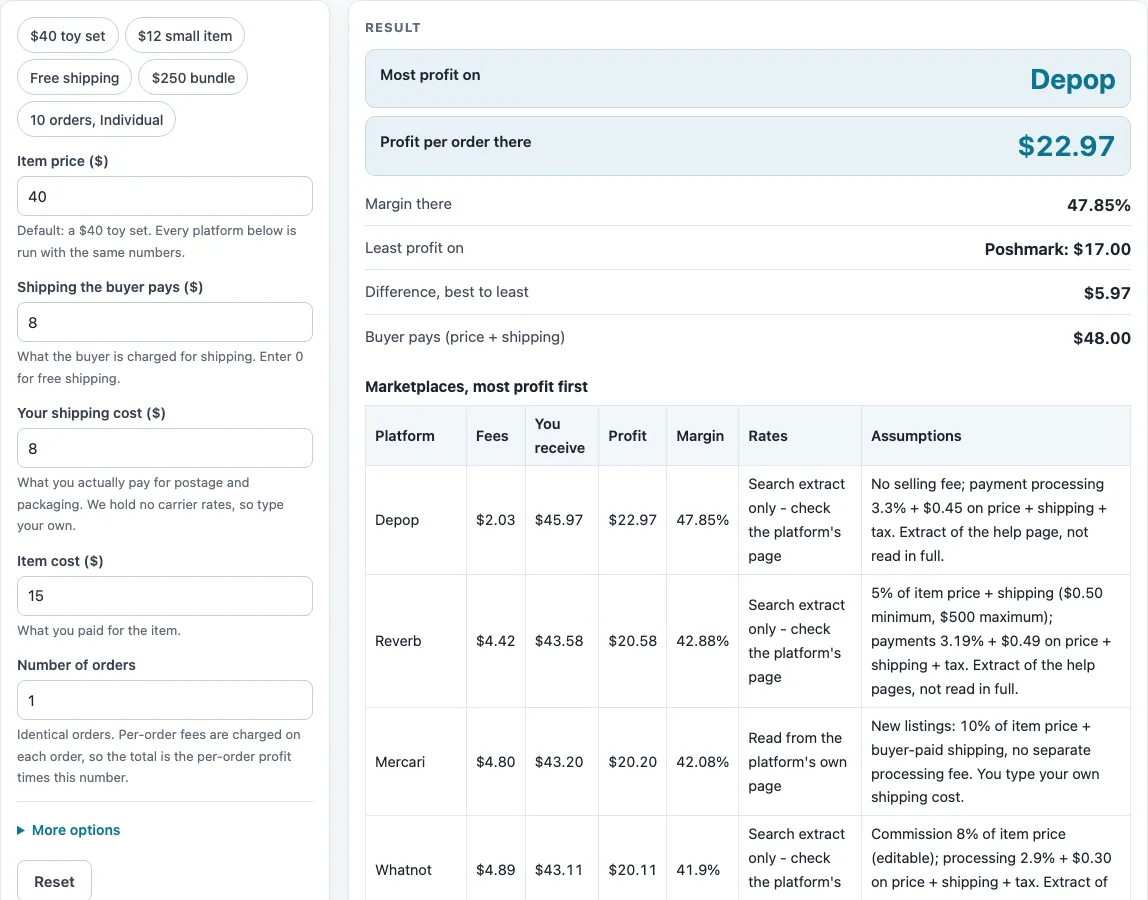
How to use the marketplace fee calculator
- Enter “Item price ($)”. The default is $40.
- Enter “Shipping the buyer pays ($)”. The default is $8. Enter 0 for free shipping.
- Enter “Your shipping cost ($)”, your postage. The default is $8.
- Enter “Item cost ($)”, what you paid for the item. The default is $15.
- Enter “Number of orders”, from 1 to 100. The default is 1.
- Open “More options” to choose the “Amazon category” (default Toys and Games) and the “Amazon selling plan” (default Professional). On Professional, enter “Amazon items sold a month” (default 100). The same section lets you hide the payment services table.
- Read the marketplace table. It is sorted by profit, highest first. Check the Rates column for each row.
- Read the payment services table separately. Its rows are labelled “(payment service)”.
- Read any warnings. One lists rows that use search-extract rates, and another appears when the top row is one of them. A loss warning counts the marketplaces where profit is negative.
The presets are “$40 toy set”, “$12 small item”, “Free shipping”, “$250 bundle” and “10 orders, Individual”. The calculation stops with a message if the item price is blank or zero, a cost is negative, or the quantity is under 1 or over 100. With more than one order, a “Profit for all orders” column is added.
How does a marketplace fee calculator work out what you keep?
The calculator takes the money the buyer pays (item price plus shipping) and subtracts each platform’s fees. You receive equals item price plus shipping minus fees. Profit equals what you receive minus item cost minus your shipping cost. Margin equals profit divided by (item price plus shipping), shown as a percent.
Why does the buyer’s shipping change the fee?
Most rows apply their rate to the item price plus the shipping the buyer pays, so shipping adds to the fee as well as to your receipts. Mercari’s row assumes a new listing at 10% of item price plus buyer-paid shipping. eBay’s row assumes most categories at 13.6% of price plus shipping, plus $0.40 per order over $10. Poshmark’s row uses a flat $2.95 fee under $15 and 20% from $15. Its fee base is the item price only, which is an assumption: the pages read did not say whether the 20% includes shipping.
Why do the Amazon numbers depend on your plan and sales volume?
The Amazon row includes only the referral fee and the plan fee. On the Professional plan, the $39.99 monthly fee is divided by the items you sell in a month. The default of 100 items gives $0.40 per item. On the Individual plan, the fee is $0.99 per item. Fulfillment, storage and advertising are not included.
Why are the payment services in a separate table?
PayPal Checkout, Stripe card and Shopify Payments (Basic plan) are processors you use with your own store. They are not marketplaces, so they have no marketplace commission and no marketplace audience. Keeping them apart stops them from being ranked against marketplaces. The PayPal page was read through a summarizer, so check it.
How reliable are the rates in the table?
The Rates column shows how each rate was confirmed. “Read from the platform’s own page” covers eBay, Amazon, Mercari, Poshmark, PayPal, Stripe and Shopify. “Search extract only - check the platform’s page” covers Depop, Whatnot and Reverb, whose rates came from a search-result extract of their help pages, not a full read. Check each platform’s own page. Whatnot’s commission varies, and this page uses its 8% base rate. Rates can change, and they were last read on 2026-10-16.
What does the marketplace fee calculator leave out?
It does not include eBay Store discounts, ads, Mercari older listings, Whatnot category rates, Reverb Preferred Seller or Amazon FBA. For these, use the platform’s own page.
Sources (checked 16 October 2026): ebay.com · sell.amazon.com · mercari.com · poshmark.com · depop.com · help.whatnot.com · help.reverb.com · paypal.com · stripe.com · shopify.com
Worked examples
| Input | Result |
|---|---|
| Price $40.00, shipping charged $8.00, postage $8.00, item cost $15.00 | Most profit: Depop, $22.97 per order |
| Price $12.00, shipping charged $5.00, postage $5.00, item cost $3.00 | Most profit: Depop, $7.99 per order |
| Price $40.00, shipping charged $0.00, postage $9.00, item cost $15.00 | Most profit: Depop, $14.23 per order |
| Price $250.00, shipping charged $25.00, postage $25.00, item cost $150.00 | Most profit: Depop, $90.48 per order |
| Price $40.00, shipping charged $8.00, postage $8.00, item cost $15.00 | Most profit: Depop, $22.97 per order |
Calculated by the tool above; open it with the same values to see each step.
Frequently asked questions
Is this marketplace fee calculator free to use?
Yes. It runs in your browser, is free, needs no sign-up, and nothing you enter is uploaded.
Why does the order of the table change?
The marketplace table is sorted by profit, highest first. When you change an input, every row is recalculated and the order updates to match.
Why might my result differ from a platform’s own page?
Each row uses the same fee function as that platform’s fee calculator on this site, so the numbers match those pages with default settings. The Assumptions column lists what each row assumes. Check that those assumptions fit your category and options.
What does the loss warning mean?
It counts the marketplaces where your profit is negative for the scenario you entered. Those rows are still shown so you can compare them.
How do I see the total for several orders?
Enter the number of identical orders, from 1 to 100. With more than one order, a “Profit for all orders” column appears, which shows the per-order profit for each row multiplied by the quantity.
Which platforms are not in the table?
Only the seven marketplaces and three payment services listed above are included. Use each other platform’s own page for its fees. Rates change, so check the platform’s page before you rely on a row.
Related tools
- Marketplace Fee and Profit Calculators: use it to browse every fee and profit calculator on this site.
- eBay Fee Calculator: use it to see eBay’s fees for one listing in detail.
- Amazon Referral Fee Calculator: use it to check the referral fee on its own for an Amazon sale.
- Amazon FBA Profit Calculator: use it when you sell through Amazon’s fulfillment service and need costs beyond the referral fee.
- Mercari Fee Calculator: use it to check Mercari’s fee for a single sale.
- Depop Fee Calculator: use it to work out Depop fees for a single sale.
- PayPal Fee Calculator: use it to see the fee on a PayPal payment in detail.
- Stripe Fee Calculator: use it to see the fee on a Stripe payment in detail.
- Shopify Fee Calculator: use it to add the Shopify plan cost per order to the payment fee.