Lego Price Per Piece Calculator
Type the set price and the piece count to get the price per piece. Add a discount or a second set to compare. Nothing is uploaded.
Recent
Your last 10 settings, saved only in this browser. Nothing is uploaded.
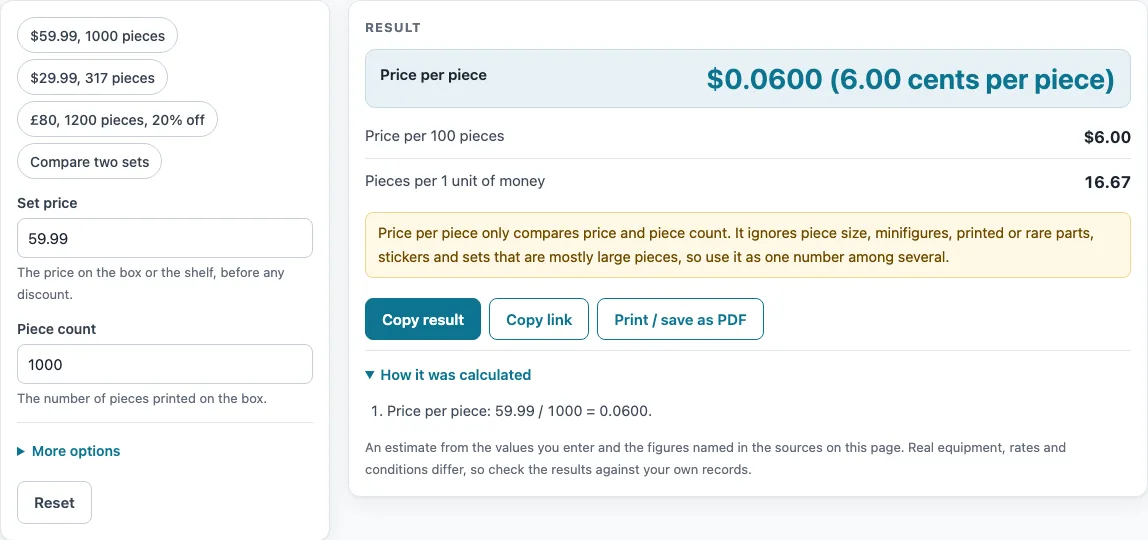
How to use the price per piece calculator
- Type the price of the set in the “Set price” box. A comma decimal such as 59,99 is accepted.
- Type the number of pieces in the “Piece count” box. Enter a whole number of 1 or more.
- Read the large “Price per piece” result. It is shown to four decimals and in cents or pence.
- Check “Price per 100 pieces” and “Pieces per 1 unit of money” for other ways to read the same price.
- Open “More options” and choose a “Currency”: “US dollars ($)”, “Pounds (£)” or “Euros (€)”.
- To include a discount, enter a percentage in “Discount (%)”. It applies to the first set only and adds a “Price after discount” result.
- To compare two sets, fill in both “Second set: price” and “Second set: piece count”. Then read “Second set: price per piece” and “Which set costs less per piece”.
- A piece count with a thousands comma, such as 1,000, is read as 1000. The discount box accepts 0 up to, but not including, 100.
The presets load ready-made examples: “$59.99, 1000 pieces”, “$29.99, 317 pieces”, “£80, 1200 pieces, 20% off” and “Compare two sets”. Open “How it was calculated” under the result to see the working. Use “Copy result”, “Copy link” or “Print / save as PDF” to keep your figures, and “Reset” to clear the form.
How do you work out the price per piece of a lego set
Divide the price of the set by its number of pieces. The formula is price per piece = price / pieces. For example, a set priced at $59.99 with 1000 pieces gives $59.99 / 1000 = $0.05999 per piece, which is 6.00 cents when rounded to cents. Multiply that by 100 and you get $6.00 per 100 pieces.
If a discount applies, work out the new price first. The formula is price after discount = price x (1 - discount/100). An £80 set with 20% off becomes £80 x (1 - 20/100) = £64.00. Divide £64.00 by 1200 pieces and you get 5.33 pence per piece.
To compare two sets, work out a price per piece for each and subtract. For example, $49.99 for 500 pieces is $0.09998 per piece, and $89.99 for 950 pieces is $0.0947 per piece. The second set costs less per piece, by $0.0053, which is 5.3% less. The “Which set costs less per piece” result shows this comparison for you.
The number is a starting point, not a verdict. A set with large pieces can look expensive per piece even when it is good value, and a set with many small pieces can look cheap. Minifigures, printed or rare parts, and stickers also add value that the division does not count.
How many pieces per dollar
Pieces per dollar is the same division turned around. Divide the number of pieces by the price: pieces / price. For a $59.99 set with 1000 pieces, that is 1000 / 59.99 = 16.67 pieces per dollar. The tool shows this as “Pieces per 1 unit of money”, using the currency you choose.
Both figures tell you the same thing in different units. Price per piece tells you the cost of one piece. Pieces per dollar tells you how many pieces one unit of money buys. Use the one that is easier for you to picture. If you are comparing several sets, compare them all with the same currency so the numbers line up.
Worked examples
| Input | Result |
|---|---|
| 59.99 for 1000 pieces | 0.0600 per piece |
| 29.99 for 317 pieces | 0.0946 per piece |
| 80 for 1200 pieces | 0.0533 per piece |
| 49.99 for 500 pieces | 0.1000 per piece |
Calculated by the tool above; open it with the same values to see each step.
Frequently asked questions
Is a lower price per piece always the better deal?
Not always. Price per piece ignores piece size, minifigures, printed or rare parts and stickers. A set made mostly of large pieces can have a high price per piece and still be worth buying.
Does the tool look up LEGO set prices or piece counts?
No. You type both the “Set price” and the “Piece count” yourself. The page does not contain a list of sets or a benchmark for a good price per piece.
Can I enter a comma instead of a decimal point?
Yes. A comma decimal such as 59,99 is accepted in the price boxes, and a thousands comma such as 1,000 is accepted in the piece count.
Why does the price per piece show four decimals?
The result is shown to four decimals so you can see small differences between sets. It is also shown in cents or pence, which is easier to read for everyday comparisons.
What values does the tool reject?
The price must be above zero. The piece count must be a whole number of 1 or more. The discount must be from 0 up to, but not including, 100. To compare, both second-set boxes must be filled in.
Is this page connected to the LEGO Group?
No. The page is not affiliated with the LEGO Group. The word LEGO only names the toy you are pricing.
- Kids Shoe Size Chart — Type your child’s foot length in cm or inches and see the size on two published brand charts side by side, from baby 1C to youth 7Y
- eBay Profit Calculator — Enter what you sell for and what it costs you to see profit after eBay fees, the margin and the break-even price
- Selling Price Calculator — Work backwards from the profit you want to the price to list, with fees included
- Marketplace Fee Comparison — Compare what several selling platforms take from the same sale