eBay Profit Calculator
Enter what you sell for and what it costs you to see profit after eBay fees, the margin and the break-even price.
Recent
Your last 10 settings, saved only in this browser. Nothing is uploaded.
How to use the eBay Profit Calculator
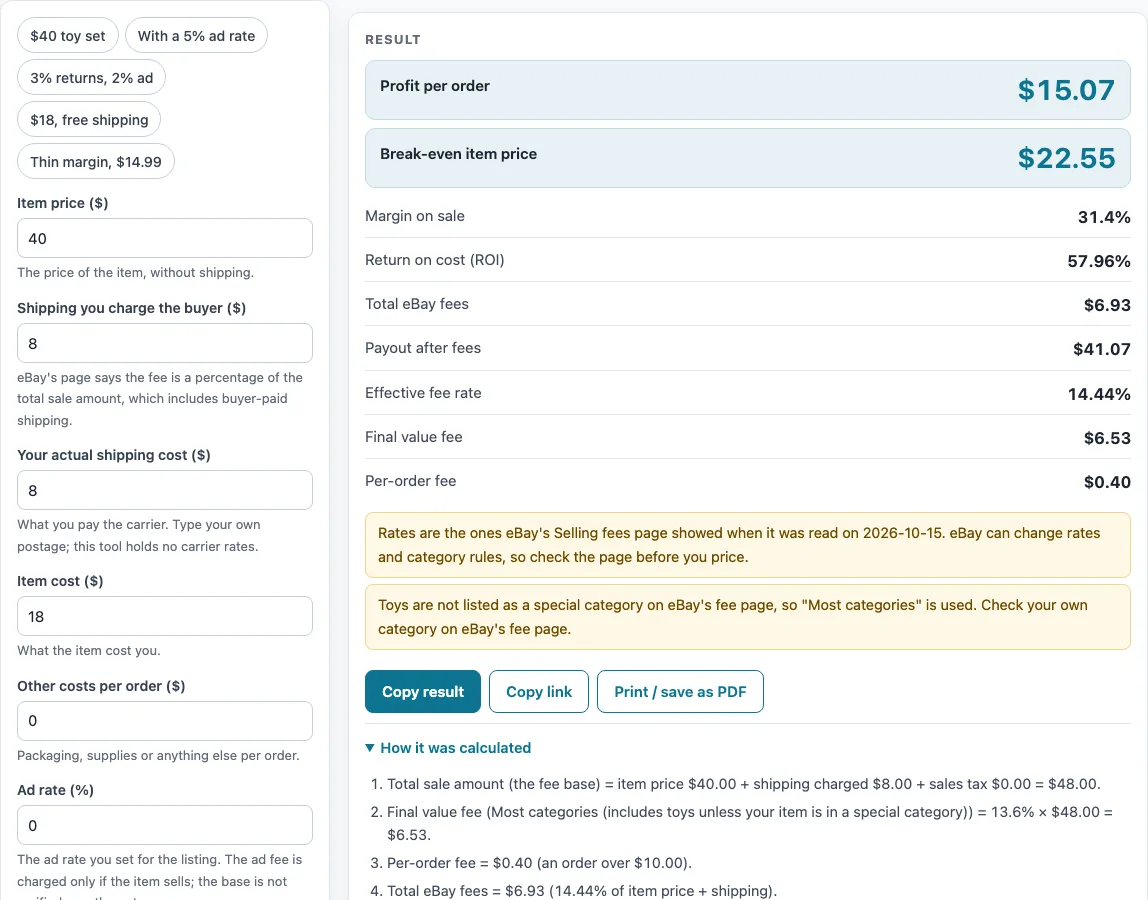
- Pick a preset if one matches your sale: “$40 toy set”, “With a 5% ad rate”, “3% returns, 2% ad”, “$18, free shipping” or “Thin margin, $14.99”. You can change any value afterwards.
- Type in “Item price ($)”, the price the buyer pays for the item without shipping.
- Put “Shipping you charge the buyer ($)” at 0 for free shipping.
- Add “Your actual shipping cost ($)”, what you pay to post the item.
- Fill in “Item cost ($)”, what the item cost you.
- Type “Other costs per order ($)”, such as packaging, as a single amount. Keep it at 0 if you have none.
- Set “Ad rate (%)” if you use promoted listings. Leave it at 0 otherwise.
- Enter “Returns allowance (% of sale)”, the share of the sale you set aside for returns. Leave it at 0 if you do not plan for returns.
- Open “More options” to choose the category. “Most categories” includes toys. If you have an eBay Store, pick the Store category and type your rate in “Store rate override (%)”. This section also holds the international fee, sales tax, number of identical orders, performance surcharge, insertion fee and per-order fee override.
- Read “Profit per order” and “Break-even item price”, then check any warning.
Presets fill in the values for a common case, so you can compare a sale with and without an ad rate or returns allowance in a few clicks.
How does the eBay profit calculator work out profit?
This tool takes your item price and shipping charged, works out the fees, then subtracts your costs. Fees are based on a total sale amount that includes shipping and sales tax, as eBay’s page describes it.
For the “Most categories” rate, the final value fee is 13.6% of the total sale amount up to $7,500, and 2.35% of any amount above that. Other categories use the rates listed in the calculator, such as 15.3% for Books & Magazines, Movies & TV and Music. A per-order fee sits on top: $0.30 for totals up to $10.00, and $0.40 above that. Any optional fees you choose get added to these.
Next, profit equals item price plus shipping charged, minus total fees, item cost, your shipping cost, other costs and the returns allowance. Multiply the ad rate by the item price plus shipping charged to get the ad fee. A warning appears because eBay’s rules for the ad fee base were not read for this tool. The returns allowance uses a percentage of that same base, but it is a cost you set yourself rather than an eBay fee.
With the default values, the total sale amount comes to $48.00. Fees total $6.93, leaving a payout of $41.07 and a profit of $15.07, or a margin of 31.4%.
Which optional fees can be added?
The “More options” section lets you add an international fee of 1.65% of the total sale amount. The page notes that this fee is not charged when a US seller offers eBay International Shipping on eligible listings. A $0.35 insertion fee is also available, and it applies only after the month’s free listings run out. Lastly, you can add a performance surcharge, which the page describes as an extra 6% on the final value fee, 7% after four or more months, and 5% or 6% for “item not as described” cases. The calculator applies that percentage to the total sale amount, which is not confirmed, so check it against your own fee statement.
What do break-even item price, margin and ROI mean?
Break-even item price is the lowest item price, to the cent, where profit reaches zero or more, with the shipping charge you entered held constant. Using the defaults, it lands at $22.55. At that price, the fee is $4.15 plus $0.40, and profit is $0.00.
Margin divides profit by the item price plus shipping charged. ROI divides profit by the item cost, shipping cost, other costs and returns. On the defaults, a 5% ad rate adds $2.40, which equals 5% of $48.00, and drops profit to $12.67.
Sources (checked 15 October 2026): ebay.com
Worked examples
| Input | Result |
|---|---|
| $40.00 item + $8.00 shipping, Most categories (includes toys unless your item is in a special category) | profit $15.07, margin 31.4%, break-even price $22.55 |
| $40.00 item + $8.00 shipping, Most categories (includes toys unless your item is in a special category) | profit $12.67, margin 26.4%, break-even price $24.43 |
| $25.00 item + $5.00 shipping, Most categories (includes toys unless your item is in a special category) | profit $8.12, margin 27.07%, break-even price $15.27 |
| $18.00 item + $0.00 shipping, Most categories (includes toys unless your item is in a special category) | profit $1.65, margin 9.17%, break-even price $16.09 |
Calculated by the tool above; open it with the same values to see each step.
Frequently asked questions
Is this eBay profit calculator free?
Yes. It is free to use and needs no sign-up. It runs in your browser.
Does the calculator upload the numbers I enter?
No. Everything runs in your browser and nothing is uploaded.
Why does a warning appear?
A warning appears when the item price is below the break-even item price, and when the sale loses money. It also appears when the ad fee base is not confirmed, because eBay’s rules for that base were not read.
Are the fees the same as what eBay charges me?
The results are calculated from your inputs and the rates published on eBay’s Selling fees page, as read on 2026-10-15. eBay can change those rates, and your own fee statement from eBay is the final record.
Does quantity change profit per order?
No. Profit per order is for one sale. The number of identical orders you enter under “More options” only changes the “Total profit, all orders” figure.
Why does the trading cards rate differ?
The page fetch showed 13.25% for trading cards, while a separate search-result snippet of a promotional page showed 12.35% for Basic+ Stores. The calculator uses 13.25%, the non-Store rate. If you have an eBay Store, pick the Store category and type its rate, and check eBay’s own page for it.
Related tools
- Marketplace Fee and Profit Calculators: browse the full set of fee and profit calculators on this site.
- eBay Fee Calculator: for a quick look at sale fees alone, this applies the same fee maths as this page.
- eBay Price Calculator: if you have a target amount in mind, this shows the item price needed to reach it.
- eBay Shipping Calculator: weigh up charging the buyer for postage against offering free shipping.
- Marketplace Fee Calculator: see one sale priced across several marketplaces at once, side by side.
- Amazon Referral Fee Calculator: selling on Amazon? This gives you its referral fee.
- Amazon FBA Profit Calculator: for Amazon sales handled through fulfillment, this works out your profit.
- Mercari Fee Calculator: built for sales made on Mercari.
- Depop Fee Calculator: the choice for sales listed on Depop.