eBay Price Calculator
Enter your costs and the profit or margin you want. You get the item price to list, with or without free shipping.
Recent
Your last 10 settings, saved only in this browser. Nothing is uploaded.
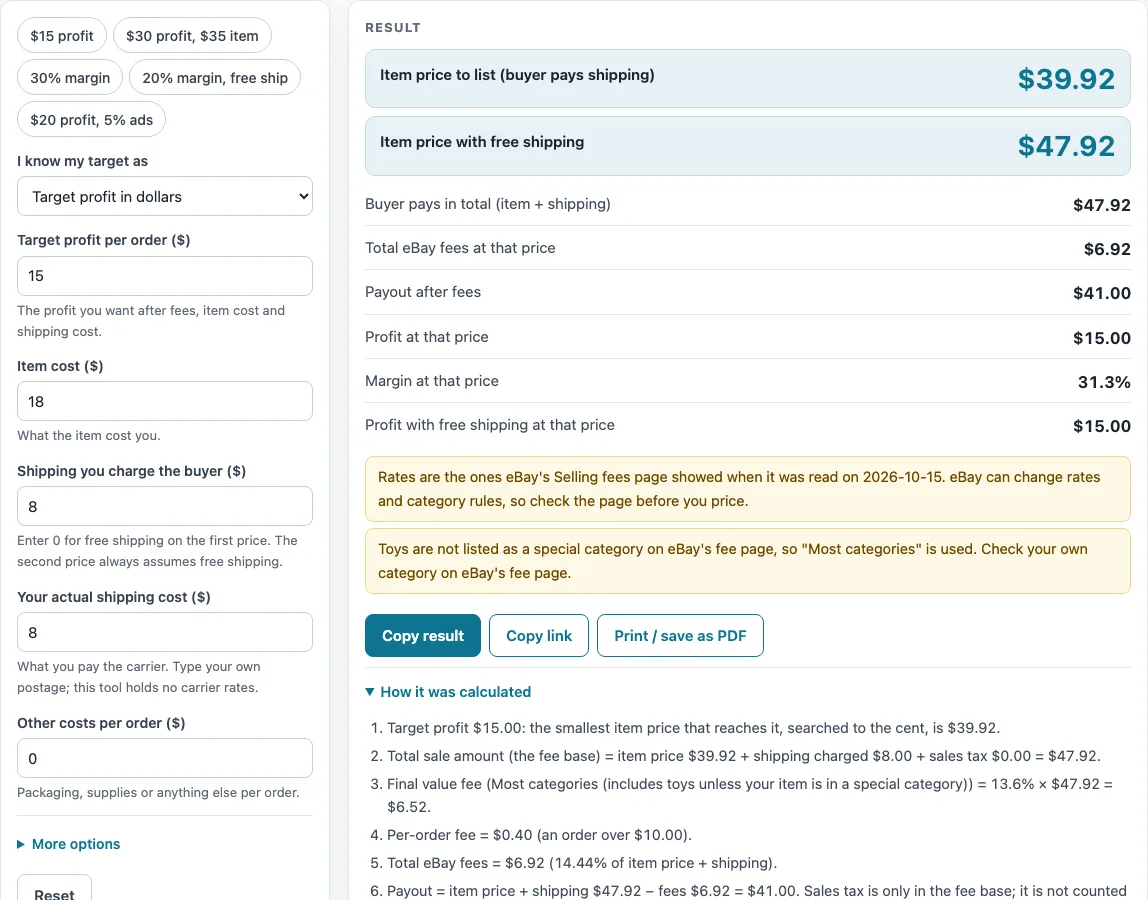
How to use the eBay Price Calculator
- Under “I know my target as”, choose “Target profit in dollars” or “Target margin in percent”. The margin is a percentage of item price plus shipping charged.
- Enter your target in “Target profit per order ($)” or “Target margin (%)”. The defaults are $15 profit and 25% margin.
- Enter “Item cost ($)”. The default is $18.
- Enter “Shipping you charge the buyer ($)”. The default is $8. Enter 0 for free shipping on the first price.
- Enter “Your actual shipping cost ($)”, your postage. The default is $8.
- Enter “Other costs per order ($)” if you have any, such as packaging.
- Open “More options” to choose the category. The default is “Most categories”. The same section holds “Ad rate (%)” and “Returns allowance (% of sale)”, which you type yourself, plus the Store rate override and the other eBay options. The ad fee is charged on item price plus shipping charged, an assumption the page flags.
- Read “Item price to list (buyer pays shipping)”. This price keeps the shipping charge you typed.
- Read “Item price with free shipping”. This price assumes you charge $0 shipping and still pay your postage.
- Check the other results: what the buyer pays in total, total eBay fees at that price, payout, profit and margin at that price, and the profit with free shipping.
The presets are “$15 profit”, “$30 profit, $35 item”, “30% margin”, “20% margin, free ship” and “$20 profit, 5% ads”. Pick one to start, then change any field to match your item.
How does an eBay price calculator work?
The calculator works backward. You set a target, and it finds the lowest item price, to the cent, where your profit reaches that target. Profit is what remains after eBay fees, item cost, your postage, and any other costs you enter.
The steps run in a fixed order. The payout is the buyer’s total minus eBay fees. Profit is the payout minus item cost minus postage. With the defaults, a $39.92 item and $8 shipping give a buyer total of $47.92, fees of $6.92, a payout of $41.00, and a profit of $15.00 after the $18 item cost and $8 postage.
Margin is profit divided by item price plus shipping charged. A 30% margin with the default costs needs an item price of $38.80. At that price the fees are $6.76, and the profit is $14.04 on $46.80, which is 30.0%.
The tool searches by bisection. It repeatedly halves the range of possible prices until it finds the lowest cent value whose profit reaches the target. One cent lower would fall short of the target.
Why does the shipping charge change the item price?
eBay’s page says the fee base is price plus shipping plus sales tax. The fee on your item price therefore depends on the shipping charge you type, and the solver includes that effect. Changing the shipping charge moves the answer.
The two outputs answer different questions. “Item price to list (buyer pays shipping)” keeps the shipping charge you typed. “Item price with free shipping” assumes you charge $0 shipping and still pay your postage. In the defaults example, the free-shipping item price is $47.92, which is higher than the $39.92 price with $8 shipping, because the free-shipping price has to cover the shipping cost as well.
Costs can also push the price up sharply. A $30 profit on a $35 item with $9 postage needs a list price of $78.11 when shipping charged is $8. A 20% margin on a $60 item with $10 postage and free shipping needs $106.03.
Which fee rates does the price calculator use?
The fee on each price follows eBay’s Selling fees page as read on 2026-10-15. For Most categories, which include toys, the final value fee is 13.6% of the total sale amount up to $7,500 and 2.35% above, plus a per-order fee of $0.30 for totals up to $10.00 and $0.40 above. Optional fees such as the 1.65% international fee, the $0.35 insertion fee and the performance surcharge can be switched on under “More options”. eBay can change its rates, so compare the answer with your own fee statement.
Sources (checked 16 October 2026): ebay.com
Worked examples
| Input | Result |
|---|---|
| target profit $15.00, item cost $18.00, shipping charged $8.00 | item price $39.92, or $47.92 with free shipping |
| target profit $30.00, item cost $35.00, shipping charged $8.00 | item price $78.11, or $86.11 with free shipping |
| target margin 30%, item cost $18.00, shipping charged $8.00 | item price $38.80, or $46.80 with free shipping |
| target margin 20%, item cost $60.00, shipping charged $0.00 | item price $106.03, or $106.03 with free shipping |
Calculated by the tool above; open it with the same values to see each step.
Frequently asked questions
Why are there two item prices?
Your shipping setting changes the answer. “Item price to list (buyer pays shipping)” keeps the shipping charge you typed. “Item price with free shipping” assumes you charge $0 shipping and still pay your postage. Use the one that matches how you plan to list.
What does it mean when the calculator shows an error?
An error means no price can reach your target. One example is fees plus a margin of 100% or more. Lower the target margin, or check that your costs are realistic.
Are the eBay fee rates current?
The results are calculated from your inputs and the rates published on eBay’s Selling fees page, as read on 2026-10-15. eBay can change those rates. Check eBay’s page before you list.
Which trading card rate does the calculator use?
The calculator uses 13.25%, from the non-Store table. A separate search-result extract of a promo page gave 12.35% for Basic+ Stores. That figure was read only from the extract, so check eBay’s own Selling fees page for the Store case, which the calculator lists under the Store override.
What is the performance surcharge warning?
eBay’s page describes an “extra 6% on FVF,” rising to 7% after 4+ months, and 5% or 6% for Very High “item not as described.” The calculator applies the percentage to the total sale amount, but that reading is not confirmed. A warning tells you to compare the result with your own fee statement.
Is the ad fee included automatically?
You enter the ad rate and any returns allowance yourself. The ad fee is charged on item price plus shipping charged. This is an assumption, and the page flags it, so compare it with your own fee statement if the ad fee matters for your pricing.
Related tools
- Marketplace Fee and Profit Calculators: use it to browse every fee and profit calculator on this site.
- eBay Fee Calculator: use it to see the fees on a price you already have in mind.
- eBay Profit Calculator: use it to see your profit at a fixed item price instead of solving for one.
- eBay Shipping Calculator: use it to compare charging the buyer for shipping with free shipping before you enter shipping charged here.
- Marketplace Fee Calculator: use it to see the same sale on several marketplaces side by side.
- Amazon Referral Fee Calculator: use it when you sell on Amazon and need its referral fee.
- Mercari Fee Calculator: use it when your sale is on Mercari.
- Depop Fee Calculator: use it when your sale is on Depop.