CPSIA Tracking Label Generator
Type the maker, place and date of production and a batch number, choose a label size, and get a print-ready sheet; switch on sequence mode for consecutive lot numbers.
Recent
Your last 10 settings, saved only in this browser. Nothing is uploaded.
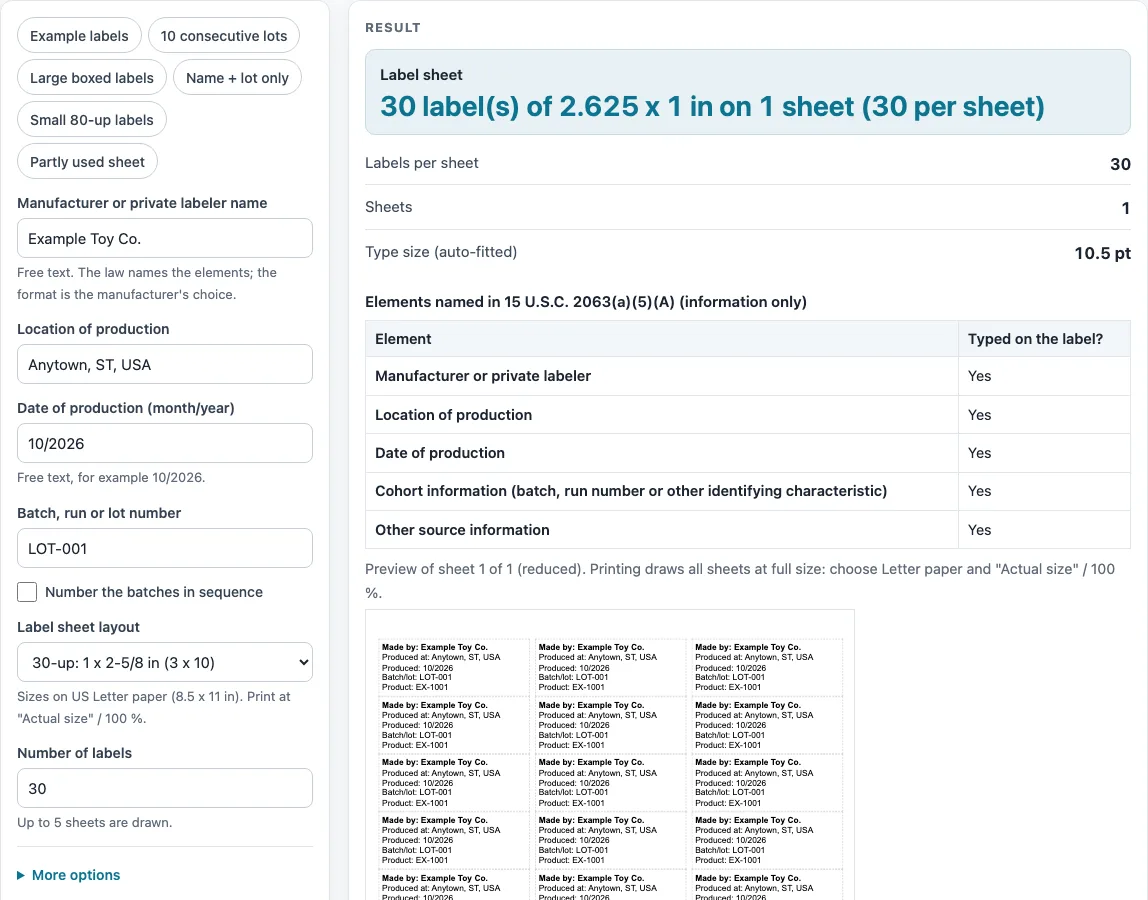
How to use the CPSIA tracking label generator
- Type your “Manufacturer or private labeler name” in the first field.
- Enter the “Location of production”.
- Enter the “Date of production (month/year)” as free text, for example 10/2026.
- Enter your “Batch, run or lot number”, such as LOT-001. For a series, switch on “Number the batches in sequence” and use “Batch prefix”, “First batch number”, “How many batch numbers”, “Labels per batch number” and “Digits (zero padding)”.
- Under “More options”, optionally add “Product name or SKU” and “Other source information”. A blank field produces no line.
- Choose a “Label sheet layout”. The default is 30-up.
- Set “Number of labels”. The default is 30, and the count is capped at 5 sheets.
- Read the “Label sheet”, “Labels per sheet”, “Sheets” and “Type size (auto-fitted)” outputs.
- Check the “Elements named in 15 U.S.C. 2063(a)(5)(A) (information only)” table and any “Not typed in:” warning.
- Print one test sheet on plain paper before you use label stock.
You can start from a preset such as “Example labels”, “10 consecutive lots”, “Large boxed labels”, “Name + lot only”, “Small 80-up labels” or “Partly used sheet”. Under “More options”, set “Skip the first positions” for a partly used sheet (positions count left to right, then down) and turn on “Border around each label” to see label edges. Printing shows only the label sheets, at 100% on Letter paper with no page margin.
What are the cpsia tracking label requirements?
The rule text in 15 U.S.C. 2063(a)(5)(A) names these elements: the manufacturer or private labeler, the location and date of production, cohort information such as a batch or run number, and other information to ascertain the source. The statute leaves the format of the label to the manufacturer. The tool’s table, “Elements named in 15 U.S.C. 2063(a)(5)(A) (information only)”, shows Yes or Blank for each element based on what you typed.
How does the tool turn your entries into label lines?
Each filled field becomes one line: “Made by:” in bold, “Produced at:”, “Produced:”, “Batch/lot:”, “Product:”, and the “Other” text exactly as typed. Blank fields produce no line, so a label can be shorter than the default five lines. Batch numbering fills the batch line in sequence. For example, prefix B-, first number 12, four digits, four numbers and five labels each gives B-0012 five times through B-0015 five times.
How is the type size chosen for each label?
The tool tries sizes from 14 pt down to 5 pt in 0.5 pt steps and uses the largest size at which the lines fit. It estimates text width with a sans-serif approximation: capitals 0.74 em, lower case 0.55 em, narrow characters 0.28 em, bold 8% wider, and lines 1.2 em high. Every label on a sheet uses the same size. With the default five lines on a 30-up label, the size is 10.5 pt. Because this is an estimate, a warning appears if text does not fit even at 5 pt, and you should check the printed result.
Where do the permanent marks go, and is a sticker enough?
The rule text says distinguishing marks should be permanent and placed on the product and its packaging, to the extent practicable. The tool only lays out text on a sticker sheet. It does not say whether a sticker is permanent enough for your product.
How are label positions and gaps calculated?
Label size, count and margins come from public label-maker template pages (worldlabel.com and avery.com, checked 16 October 2026). Columns, rows and gaps are derived by the tool, with labels spread evenly between the stated margins on 8.5 x 11 in. For example, a 30-up gap is 0.09275 in across and 0 down. Real sheets from a label maker may differ by a small amount, so print a test page on plain paper first.
Sources (checked 16 October 2026): worldlabel.com · avery.com · govinfo.gov · cpsc.gov · worldlabel.com · worldlabel.com · worldlabel.com · worldlabel.com · avery.com
Worked examples
| Input | Result |
|---|---|
| Example Toy Co., LOT-001 | 30 label(s) of 2.625 x 1 in on 1 sheet (30 per sheet) |
| Example Toy Co., LOT-001 | 20 label(s) of 2.625 x 1 in on 1 sheet (30 per sheet) |
| Example Toy Co., LOT-001 | 6 label(s) of 4 x 2 in on 1 sheet (10 per sheet) |
| Example Toy Co., LOT-001 | 40 label(s) of 1.75 x 0.5 in on 1 sheet (80 per sheet) |
Calculated by the tool above; open it with the same values to see each step.
Frequently asked questions
Can this tool check my label against CPSIA requirements?
No. The tool lays out text on sticker sheets and does not test, certify or decide what a label must contain. The importer, manufacturer or private labeler issues any certificate, based on test reports from a CPSC-accepted laboratory.
Why is my type size smaller than 14 pt?
The tool picks the largest size from 14 pt down to 5 pt at which every line fits the label. Long names or addresses force a smaller size, and every label on the sheet uses that same size.
What does the “Not typed in:” warning mean?
It lists elements you left blank, such as the batch or the location of production. It is a note about your entries, not a finding about the label.
Can I print on a partly used sheet?
Yes. Set “Skip the first positions” to leave the used positions empty. Positions count left to right, then down.
Why is US Letter assumed for some layouts?
The template pages do not state a page size for the 20-, 10- and 6-up sheets. Their counts and margins only add up to 8.5 x 11 in, so Letter is assumed. Print a test page on plain paper before you use label stock.
Can I number ten consecutive lots automatically?
Yes. Use the batch numbering fields “Batch prefix”, “First batch number”, “How many batch numbers” and “Labels per batch number”. The total is the number of batch numbers multiplied by labels per number. The “10 consecutive lots” preset is a starting point you can change.
Related tools
- Warning and Tracking Labels: use when you want the overview of the label tools on this site.
- Choking Hazard Warning Label: use when you want to lay out one of the choking hazard statements as printable label text.
- Choking Hazard Warning for Online Listings: use when you want to prepare statement text for an online product listing.
- Warning Label Generator: use when you want to print your own lines of text on a label sheet.
- Children’s Product Certificate Generator: use when you want to lay out a children’s product certificate sheet.
- CPSIA Testing Checklist: use when you want a worksheet of the rules on CPSC’s third-party testing list.