Choking Hazard Warning Label
Pick the situation, enter the size of your package's principal display panel, and get the exact statement with warning triangle on a label sheet, sized from the rule's minimum letter heights.
Recent
Your last 10 settings, saved only in this browser. Nothing is uploaded.
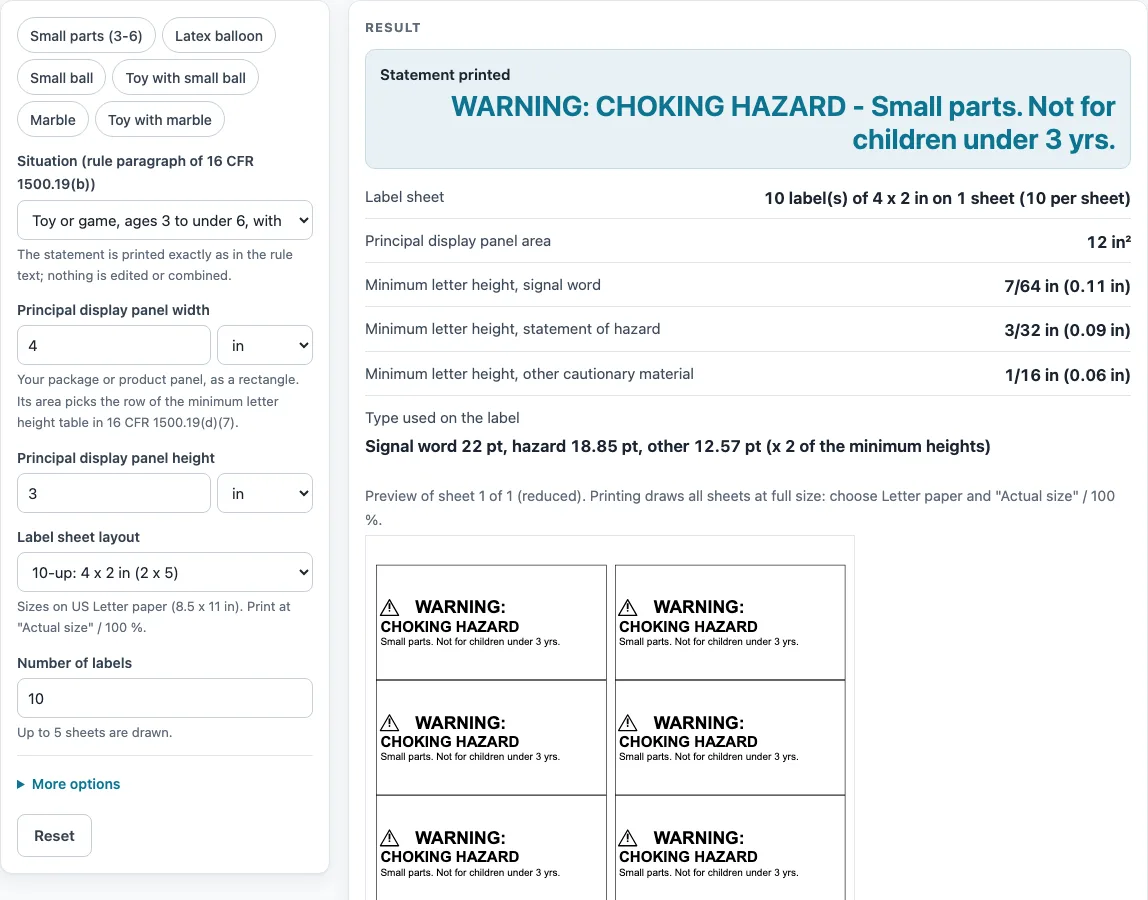
How to use the Choking Hazard Warning Label Tool
- In “Situation (rule paragraph of 16 CFR 1500.19(b))”, choose the situation that matches your product. The tool does not choose this for you. The six presets match the six statements.
- Check “Statement printed” to confirm the wording. It is printed exactly as the rule text gives it.
- Enter the “Principal display panel width” and “Principal display panel height”, in inches or cm. The tool multiplies them into an area in square inches.
- Read “Principal display panel area” and the three minimum letter height rows. The area picks the row.
- Check “Type used on the label” for the point sizes. If the text cannot fit at the minimum heights, the tool gives the label size and point sizes needed, and the sheet is drawn with the text clipped.
- Choose a “Label sheet layout”: 30-up, 20-up, 10-up, 6-up, 80-up, single 4 x 6 in, or custom size and margins.
- Set “Number of labels” (default 10), “Skip the first positions” for a partly used sheet, and “Border around each label” (on by default). Fill in the “Custom:” fields if you chose custom.
- Review “Label sheet”, then print on a Letter page at 100 %. Print a test page on plain paper first.
The tool draws up to 5 sheets. Combined statements and the small-package alternative are not offered. The printed footer says the sheet is filled in by the seller, who is responsible for its content.
What does a choking hazard warning statement say?
The rule text in 16 CFR 1500.19(b) sets out six statements, one for each situation in the tool’s list. Each statement is printed exactly as the rule text gives it, for example “WARNING: CHOKING HAZARD - Small parts. Not for children under 3 yrs.” The eCFR shows the statements as images, so the wording was taken from CPSC Publication 282.
How does the panel area choose the minimum letter height?
The tool multiplies the principal display panel width and height to get a plain rectangle area in square inches. That area picks one row of the minimum letter height table in 16 CFR 1500.19(d)(7). Areas up to 2 square inches use 3/64, 3/64 and 1/32 inch for the signal word, statement of hazard and other cautionary material. Larger areas use bigger heights, up to 1/2, 1/4 and 5/32 inch for 400 square inches and over.An area exactly on an edge takes the larger row, which is an assumption. The tool does not apply the area definition in 16 CFR 1500.121(c)(1), because that section was not read. The default 4 x 3 inch panel is 12 square inches, in the 10-15 row.
How is a letter height turned into a point size?
Points equal the letter height in inches multiplied by 72 and divided by 0.716, the capital-letter height of a sans-serif face such as Arial as a share of the font size. This is a stated assumption, because the definition of “height of letters” in 1500.121(c)(1) was not read. For the 12 square inch row, the minimum sizes are 11.0, 9.43 and 6.28 points. The type is then enlarged by up to 2 times as far as it fits the label, but never below the minimum.
How is the warning triangle placed?
The triangle is equilateral and 1.25 times the signal word letter height. Its exclamation point is 54 % of the triangle height and centered. A gap of 0.95 em, about the width of a bold W, separates the triangle from the signal word.The triangle sits on the same line as “WARNING:”. “CHOKING HAZARD” is set on its own line, and the rest of the statement is wrapped beneath it. The design is black on a solid white background.
What happens when the text does not fit the label?
If the text cannot fit at the minimum heights, the tool reports the label size and point sizes needed, and draws the sheet with the text clipped. The type is not reduced below the minimum. The (b)(2) balloon statement does not fit a 1.75 x 0.5 inch label.
Sources (checked 16 October 2026): ecfr.gov · cpsc.gov · worldlabel.com · avery.com · worldlabel.com · worldlabel.com · worldlabel.com · worldlabel.com · avery.com
Worked examples
| Input | Result |
|---|---|
| Statement b1, panel 12 sq in | WARNING: CHOKING HAZARD - Small parts. Not for children under 3 yrs. |
| Statement b2, panel 48 sq in | WARNING: CHOKING HAZARD - Children under eight yrs. can choke or suffocate on uninflated or broken balloons. Adult supervision required. Keep uninflated balloons from children. Discard broken balloons at once. |
| Statement b3i, panel 120 sq in | WARNING: CHOKING HAZARD - This toy is a small ball. Not for children under 3 yrs. |
| Statement b3ii, panel 300 sq in | WARNING: CHOKING HAZARD - Toy contains a small ball. Not for children under 3 yrs. |
Calculated by the tool above; open it with the same values to see each step.
Frequently asked questions
Which statement should I use for my product?
The tool does not choose it for you. Pick the situation in “Situation select” that matches your product, and read the wording in “Statement printed” against the rule text in 16 CFR 1500.19(b).
Can this tool check my label against the rule?
No. It draws the statement you pick at the minimum letter heights for the panel size you enter. The site does not test products, certify them or issue certificates.
Is a small parts warning label the same as a choking hazard label?
The statements in the rule text use the words “CHOKING HAZARD” and “Small parts”. The Small parts (3-6) preset prints the statement for a toy or game for ages 3 to under 6 with a small part.
Where can I read the toy labeling requirements?
Check 16 CFR 1500.19 on the eCFR. The tool’s wording and table values come from that section, and the area definition in 1500.121(c)(1) was not read for this tool.
Can I print the labels on any paper?
Print on a Letter page at 100 %. Print a test page on plain paper first, because real label sheets may differ slightly from the layout the tool draws.
Why is the type bigger than the minimum?
The type is enlarged by up to 2 times as far as it fits the label. It is never set below the minimum letter height.
Related tools
- Warning and Tracking Labels: use when you want the overview of the label tools on this site.
- Choking Hazard Warning for Online Listings: use when you want the statement text for a product listing rather than a printed label.
- CPSIA Tracking Label Generator: use when you want to lay out tracking label text, separate from the choking hazard statement.
- Warning Label Generator: use when you want to print your own lines of text on a label sheet.
- Age Grading Worksheet for Toys: use when you want to record the age notes behind a toy’s intended age.
- ASTM F963 Checklist: use when you want a worksheet of the topic headings CPSC lists for toy safety.