Choking Hazard Warning for Online Listings
Tick the situation(s), then copy the full choking hazard statement as plain text or HTML-safe text to put on or next to your listing.
Recent
Your last 10 settings, saved only in this browser. Nothing is uploaded.
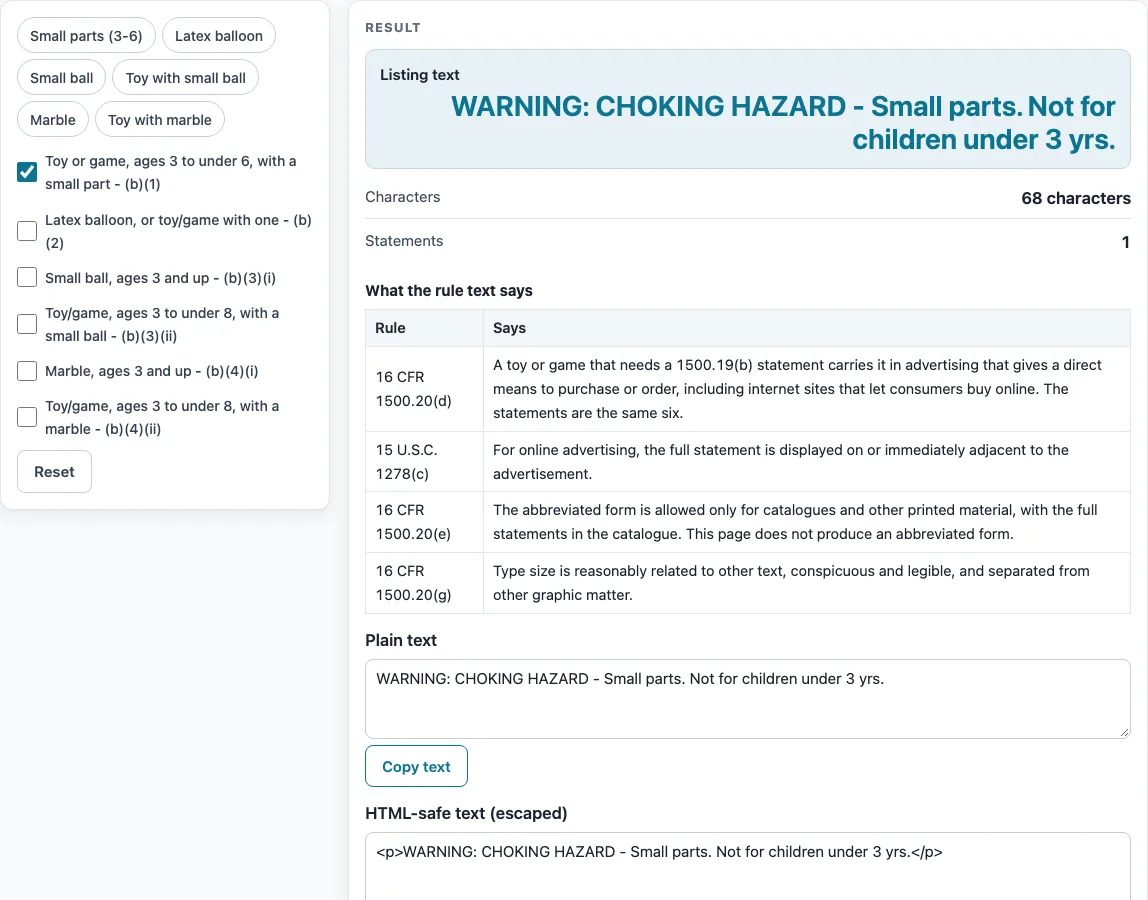
How to use this tool
- Open the tool. The “Small parts (ages 3 to under 6)” box is ticked by default.
- Tick each box that matches your product. The six boxes are: Small parts (ages 3 to under 6), Latex balloon, Small ball, Toy with a small ball, Marble and Toy with a marble.
- If you want one statement only, use a preset: Small parts (3-6), Latex balloon, Small ball, Toy with small ball, Marble or Toy with marble. Each preset gives one statement.
- Read the “Listing text” output. Each ticked statement is listed in full, with a blank line between statements. The statements are not merged.
- Check the “Statements” count. It should match the number of boxes you ticked.
- Check the “Characters” count. This is the length of the plain text, including blank lines. No marketplace character limits are given here, so check your platform’s own limit.
- Copy the output. The “Plain text” box and the “HTML-safe text” box each have a Copy text button. The HTML-safe version is escaped, with one
<p>per statement. - Paste the text into your listing. The rule text says the full statement is displayed on or immediately adjacent to the advertisement, and this tool never produces the abbreviated form.
- The rule text asks for type size reasonably related to other text, conspicuous and legible, and separated from other graphic matter; the tool cannot see your page, so you check that.
Everything runs in the browser, and nothing you enter is uploaded.
What does the rule text say about online listings?
16 CFR 1500.20(d) says the statement goes in advertising that gives a direct means to purchase or order, including internet sites where consumers can buy online. A listing where a buyer can purchase the product is the kind of advertising this paragraph describes. Whether your own listing falls under it is your decision.
Where must the statement appear in an online ad?
The rule text in 15 U.S.C. 1278(c) says that for online advertising, the full statement is displayed on or immediately adjacent to the advertisement.
Why does this tool never produce the short form?
16 CFR 1500.20(e) allows the abbreviated form, with numbers in parentheses, only for catalogues and other printed material. This page therefore never produces the short form and gives the full statement only.
What does the type size rule ask for?
16 CFR 1500.20(g) says the type size should be reasonably related to other text, conspicuous and legible, and separated from other graphic matter. Those are the rule text’s own words. The tool cannot see how your page looks, so checking them is up to you.
Why are several statements listed separately?
When more than one box is ticked, each statement is listed separately and in full, with a blank line between them. The tool does not merge them into one sentence. This keeps each statement’s wording as it appears in the rule text.
Who decides which statement applies and checks the product?
The page does not decide which statement a product needs; you pick the boxes. The site does not test products or issue certificates. The importer, manufacturer or private labeler issues the certificate, based on test reports from a CPSC-accepted laboratory.
Where does the statement wording come from?
The eCFR shows the statements as images, so the wording on this page comes from the text of CPSC Publication 282. A plain hyphen is used in the statements, as in “WARNING: CHOKING HAZARD - Small parts. Not for children under 3 yrs.” That example statement is 68 characters long. 16 CFR 1500.20(d) says the statements for advertising are the same six as in 1500.19(b), so the tool offers those six and no others.
Sources (checked 16 October 2026): ecfr.gov · cpsc.gov · govinfo.gov · ecfr.gov
Worked examples
| Input | Result |
|---|---|
| 1 statement(s) ticked | 68 characters of listing text |
| 1 statement(s) ticked | 209 characters of listing text |
| 2 statement(s) ticked | 152 characters of listing text |
| 1 statement(s) ticked | 77 characters of listing text |
Calculated by the tool above; open it with the same values to see each step.
Frequently asked questions
Is this tool a certificate for my product?
No. The site does not test products or issue certificates. The importer, manufacturer or private labeler issues the certificate, based on test reports from a CPSC-accepted laboratory.
Which statement does my product need?
This page does not decide that. Tick the boxes you judge match your product and read 16 CFR 1500.19(b) for the situations each statement covers.
Does the rule cover online listings?
The rule table on this page says 16 CFR 1500.20(d) puts the statement in advertising that gives a direct means to purchase or order, including internet sites where consumers can buy online. Whether that covers your listing is your decision.
Can I use a shorter version of the statement?
16 CFR 1500.20(e) allows the abbreviated form only for catalogues and other printed material. This tool never produces it and gives the full statement only.
Where should the statement go in an online ad?
The rule text in 15 U.S.C. 1278(c) says the full statement is displayed on or immediately adjacent to the advertisement.
What does the Characters count include?
It is the length of the plain text, including blank lines. No marketplace character limits are given, so check your platform’s limit before you paste.
Related tools
- Warning and Tracking Labels: use when you want the overview of the label tools on this site.
- Choking Hazard Warning Label: use when you want a printed label with minimum type sizes rather than listing text.
- CPSIA Tracking Label Generator: use when you want to lay out tracking label text instead of a warning statement.
- Warning Label Generator: use when you want to print your own lines of text on a label sheet.
- Age Grading Worksheet for Toys: use when you want to record the age notes behind a toy’s intended age.
- ASTM F963 Checklist: use when you want a worksheet of the topic headings CPSC lists for toy safety.