Children's Product Certificate Generator
Type your product, the rules your lab report lists, and the certifier, manufacturer and lab details; you get a printable certificate sheet, one page per product. It lays out your words only and issues nothing.
Recent
Your last 10 settings, saved only in this browser. Nothing is uploaded.
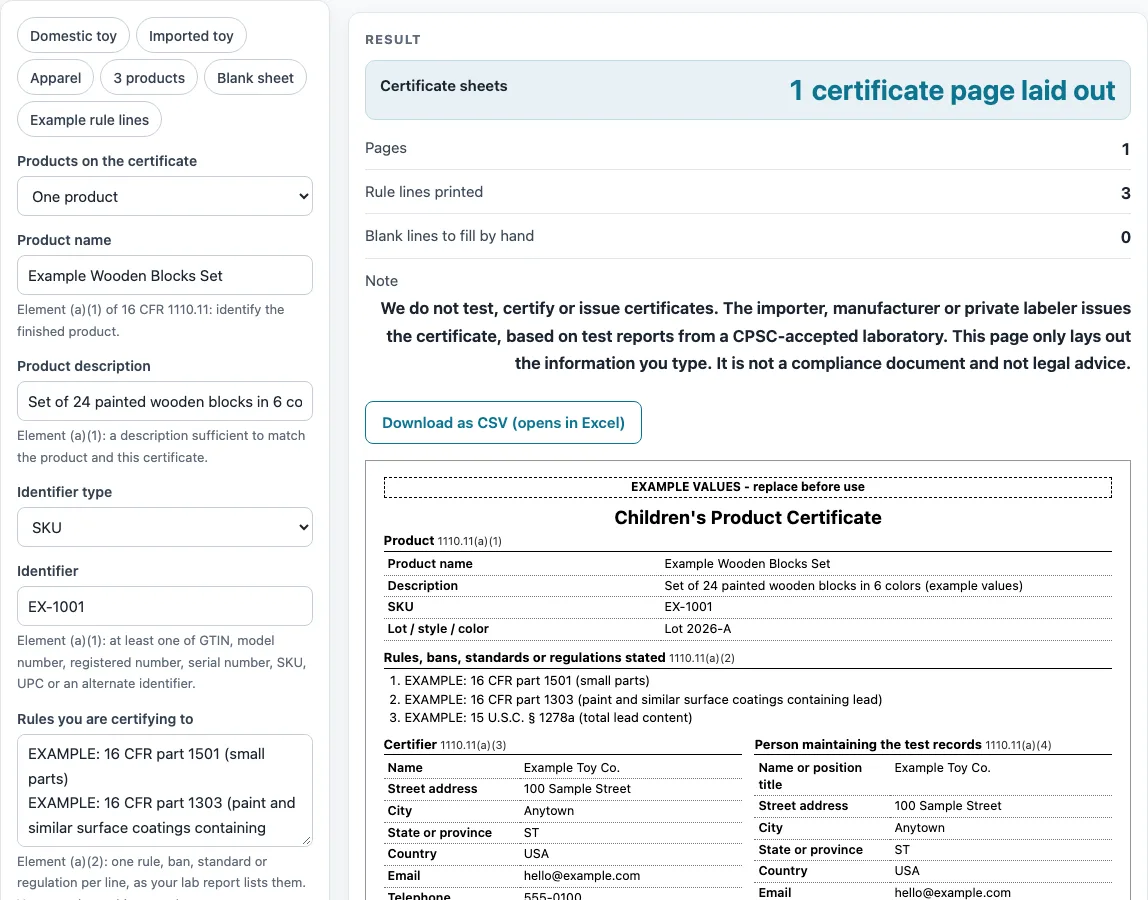
How to use the Children’s Product Certificate Generator
- Pick a preset (“Domestic toy”, “Imported toy”, “Apparel”, “3 products” or “Blank sheet”), or keep the example defaults.
- Under “Products on the certificate”, choose “One product” or “Several products (one page each)”.
- Enter “Product name” and “Product description”. Choose the “Identifier type” (SKU, Model number, UPC / GTIN, Serial number or Other identifier) and type the “Identifier”.
- In “Rules you are certifying to”, type one rule per line. Each line prints as its own numbered item, up to 30 lines.
- Fill in the certifier fields: name, street address, city, state or province, country, email and telephone.
- Enter “Date of manufacture” as month and year, then the manufacturer’s details, and the “Most recent test date”.
- Open “More options” for “Lot / style / color (optional)”, the boxes “Print attestation and signature line”, “Print records contact block” and “Print electronic access URL line”, “Imported product (adds a note)”, and “Number of testing labs” (0 to 3) with each lab’s fields.
- Read the warnings and the “Blank lines to fill by hand” count. Empty fields print as ten underscores.
- Choose “Download as CSV (opens in Excel)” or “Print / save as PDF”.
In multi-product mode, “Products, one per line” reads name | identifier | description, up to 25 lines, one page per product. The “Blank sheet” preset gives 37 blank lines to fill in by hand.
What is a children’s product certificate?
A children’s product certificate is a document that lists the rules the certifier states, along with the product details, testing information and contact details that 16 CFR 1110.11 asks for. This page only lays those items out in order so you can read and print them; it does not decide what the certificate should say.
Who issues a children’s product certificate?
The importer, manufacturer or private labeler issues the certificate, as 16 CFR 1110.7 provides. CPSC’s children’s product certificate page says it is based on test results from a third-party, CPSC-accepted laboratory. The page states this in a note under the result and in a footer on each printed sheet.
What does 16 CFR 1110.11 list for a children’s product certificate?
The sheet follows the order of 16 CFR 1110.11. It has a product section (1110.11(a)(1)), a rules section (a)(2), a certifier (a)(3), a person maintaining the test records (a)(4), the date and place of manufacture (a)(5), a testing section (a)(6), electronic access (b), and the attestation and signature (a)(7). The rules section takes the rules you enter, one per line, and the page never suggests which rules apply to your product. CPSC’s rules-list page says a CPC for toys under ASTM F963 must list the individual F963 sections, not only 16 CFR part 1250. That line came from a summarized fetch of the CPSC page and was not checked word for word, so read CPSC’s own page before you rely on it.
Why does each children’s product certificate describe only one product?
16 CFR 1110.13(a) says each certificate must describe only one product. For that reason, the “Several products (one page each)” option prints one page per product. If you enter more than 25 lines, the extra lines are cut and a warning appears.
What must the date of manufacture show on a children’s product certificate?
16 CFR 1110.11(a)(5) asks for the month and year at minimum. The date check accepts formats such as 03/2026, 2026-03, March 2026 and Mar. 2026. Entries that show only a year, or text such as spring 2026, trigger a warning.
How does an imported product’s children’s product certificate differ?
When you tick “Imported product (adds a note)”, the sheet adds a note. The page states that certificates for imports are eFiled under 16 CFR 1110.13(a)(1), and that the paper sheet is not the eFiling itself. The eCFR text of part 1110 sets out the eFiling rules.
Sources (checked 16 October 2026): ecfr.gov · cpsc.gov · ecfr.gov · cpsc.gov · cpsc.gov · cpsc.gov
Worked examples
| Input | Result |
|---|---|
| Product "Example Wooden Blocks Set", 1 sheet | 1 page(s), 3 rule line(s), 0 blank line(s) |
| Product "Example Stacking Rings", 1 sheet | 1 page(s), 3 rule line(s), 0 blank line(s) |
| 2 products, one per line | 2 page(s), 3 rule line(s), 0 blank line(s) |
| Product "__________", 1 sheet | 1 page(s), 0 rule line(s), 37 blank line(s) |
Calculated by the tool above; open it with the same values to see each step.
Frequently asked questions
Does this tool test my product or issue a certificate?
No. The page lays out a printed sheet from the values you type. The importer, manufacturer or private labeler issues the certificate under 16 CFR 1110.7.
Which rules should I list in the rules box?
That decision is yours. The page has no list of rules to tick and does not suggest which rules apply to your product. Enter the rules your certifier has decided on, one per line.
Is my information uploaded anywhere?
No. The sheet is built in your browser from the values you type, and nothing is uploaded. No sign-up is needed.
Why does my sheet show “EXAMPLE VALUES - replace before use”?
The mark appears when fictitious example values are in use, including any email ending in @example.com. Replace all example values with your own details before you print or save the sheet.
What happens if I enter only a year as the manufacture date?
The page shows a warning that month and year are the minimum under 16 CFR 1110.11(a)(5). Enter the month and year, such as 03/2026, to clear it.
Can I print a separate page for each product?
Yes. Choose “Several products (one page each)” and enter one product per line in “Products, one per line” using the form name | identifier | description. “Print / save as PDF” prints one certificate sheet per page.
Related tools
- Children’s Product Certificates: use when you want the overview of the certificate tools on this site.
- General Certificate of Conformity Generator: use when you want the layout of a general certificate of conformity instead of a children’s product certificate.
- CPSIA Testing Checklist: use when you are organising your testing notes and lab details.
- ASTM F963 Checklist: use when you are reviewing the F963 sections named in your lab report.
- Age Grading Worksheet for Toys: use when you want to record the age notes behind a toy’s intended age.
- CPSIA Tracking Label Generator: use when you want to lay out tracking label text for a product and its packaging.
- Choking Hazard Warning Label: use when you want to lay out a choking hazard warning label.
- Label Sheet Layout: use when you want to print several labels on one sheet.