Amazon FBA Profit Calculator
Pick a category, type the price, your cost and the FBA fee from Amazon. You get the referral fee, total cost per unit, profit, margin, ROI and break-even price.
Recent
Your last 10 settings, saved only in this browser. Nothing is uploaded.
How to use the Amazon FBA Profit Calculator
- Choose a “Category”. This sets the referral fee percentage and minimum.
- Type your “Item price ($)” and your “Item cost ($)”.
- Open Amazon’s FBA page (sell.amazon.com/fulfillment-by-amazon#fba-costs) or its Revenue Calculator (sellercentral.amazon.com/revcalpublic). Type the fee you find into “FBA fulfillment fee per unit ($)”. Do not leave it at 0, because that overstates your profit.
- Enter “Inbound shipping per unit ($)”, “Storage per unit ($)” and “Advertising per unit sold ($)”. Use 0 for any cost you do not have.
- Open “More options” if you need more. Enter “Shipping the buyer pays ($)” if you charge shipping, and “Other costs per order ($)” for any other cost on each order.
- Pick a “Selling plan”. On the Professional plan, set “Items sold per month” so the monthly fee is spread across your units. On the Individual plan, the “Individual plan, per item ($)” charge applies to each sale.
- Set “Number of orders” to see “Profit for all orders”.
- Read “Profit per order”, “Platform pays out”, “Margin on sale”, “ROI on cost” and “Break-even price”.
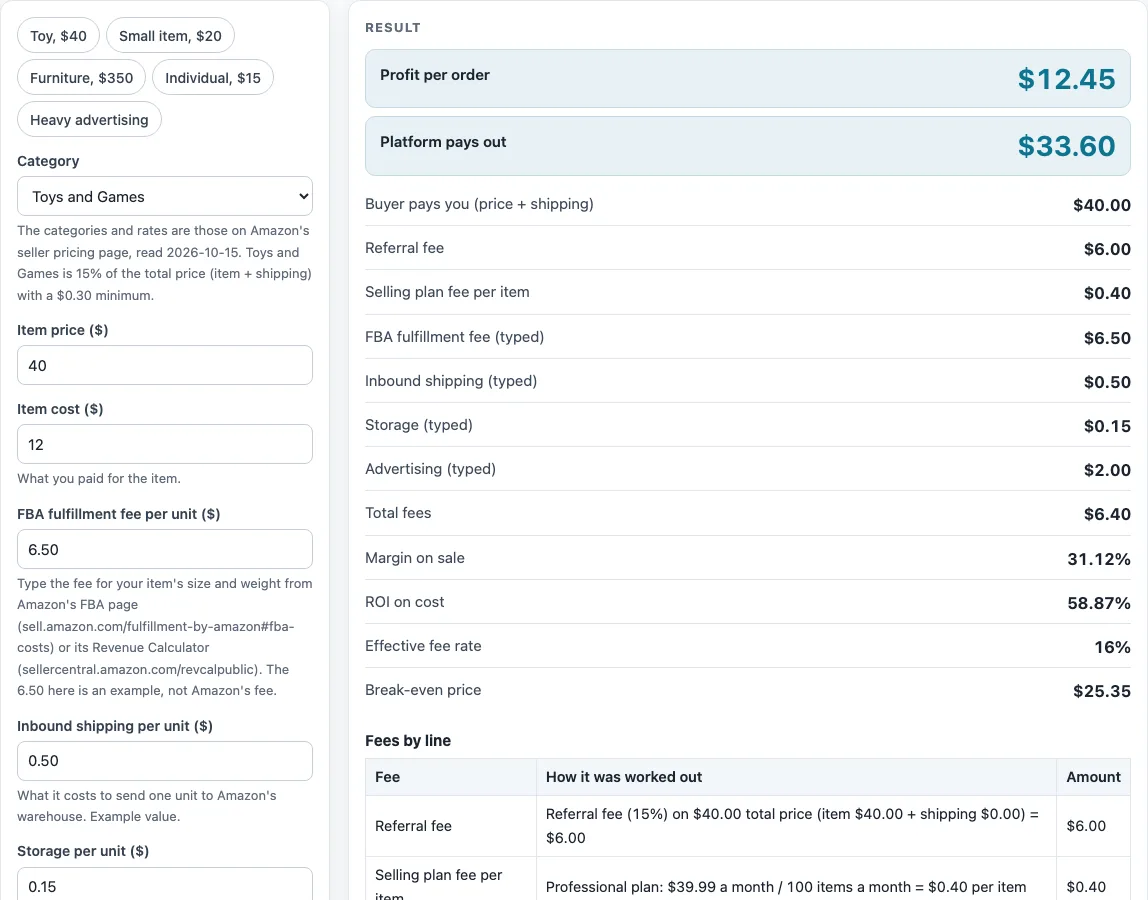
The presets “Toy, $40”, “Small item, $20”, “Furniture, $350”, “Individual, $15” and “Heavy advertising” fill in example numbers, so you can see how the results change. Replace the numbers with your own before you rely on the output. The “Referral fee (%), override” and “Minimum referral fee ($), override” controls are under “More options” and should only be used if you have a rate to type in.
How is Amazon FBA profit calculated?
Profit per order is what the platform pays you, minus your item cost and the per-unit costs you type in. The platform payout is the price the buyer pays, including any shipping charged, minus the Amazon fees. The fees are the referral fee, the media closing fee where it applies, and the selling plan cost per item. The FBA fulfillment fee, inbound shipping, storage and advertising are numbers you type, and they are subtracted as costs.
How does the Amazon referral fee work?
The referral fee is the category percentage of the total price, which is the item price plus shipping charged. If the category minimum is greater than that amount, the minimum applies instead. Some categories use bands, where each rate applies only to the part of the price inside its band. The Furniture example at $350 is 15% of the first $200 plus 10% of the next $150, which comes to $45.00. Other categories, such as Clothing and Accessories, use one rate for the whole price, chosen by the price range. Notes on Fine Art and that threshold wording are on the referral calculator page, and you should check Amazon’s fee pages for the category you choose.
How is the selling plan fee per item worked out?
On the Professional plan, the $39.99 monthly fee is divided by “Items sold per month”. At the default of 100 items, that is $0.40 per item. On the Individual plan, the fee is $0.99 per item, so each sale carries that charge whatever your volume.
What is break-even price?
Break-even price is the smallest price, in whole cents, at which profit is $0 or more with the same costs. With the defaults, it is $25.35. Because the referral fee is a percentage of the price, the referral share has to be taken out of each sale too, so the break-even price is higher than your fixed costs alone would suggest.
What is the difference between margin and ROI?
Margin is profit divided by the item price plus shipping charged. ROI is profit divided by the item cost plus all the per-unit costs you typed in. Both use different bases, so they give different percentages. With the defaults, margin is 31.13% and ROI is 58.87%.
What do the default numbers show?
The defaults are a Toys and Games item at a $40 price with a $12 item cost, on the Professional plan. The referral fee is $6.00 and the plan fee is $0.40. The typed costs are an example FBA fee of 6.50, inbound 0.50, storage 0.15 and advertising 2.00, which add up to $9.15. Amazon pays out $33.60, and the profit is $12.45. These typed amounts are example numbers, not Amazon’s fees, so replace them with your own.
Sources (checked 15 October 2026): sell.amazon.com · sellercentral.amazon.com · sell.amazon.com
Worked examples
| Input | Result |
|---|---|
| Amazon (FBA): item price $40.00, item cost $12.00 | Fees $6.40, payout $33.60, profit $12.45 (31.12% margin) |
| Amazon (FBA): item price $20.00, item cost $5.00 | Fees $3.40, payout $16.60, profit $5.45 (27.25% margin) |
| Amazon (FBA): item price $350.00, item cost $140.00 | Fees $45.40, payout $304.60, profit $129.95 (37.13% margin) |
| Amazon (FBA): item price $15.00, item cost $4.00 | Fees $3.24, payout $11.76, profit $3.51 (23.4% margin) |
Calculated by the tool above; open it with the same values to see each step.
Frequently asked questions
Where do I find the FBA fulfillment fee for my product?
Use Amazon’s FBA page at sell.amazon.com/fulfillment-by-amazon#fba-costs or its Revenue Calculator at sellercentral.amazon.com/revcalpublic. The tool stores no FBA fee table, so you type the amount in yourself. The default of 6.50 is an example number, not Amazon’s fee.
Is this amazon fba calculator free to use?
Yes. It is free, runs in your browser, and does not upload what you type. You do not need to sign up.
Why does the calculator show a loss?
A loss means your fees and typed costs are more than what Amazon pays you after the item cost is taken out. Check the “FBA fulfillment fee per unit ($)” first, since an incorrect fee changes the result the most.
Does the tool add advertising costs automatically?
No. “Advertising per unit sold ($)” only includes the number you type. Enter 0 if you do not plan to advertise.
What happens if I leave the FBA fee at 0?
The tool warns you. A fee of 0 leaves out a real cost, so the profit it shows is overstated.
Are the fee rates current?
Marketplace rates change. The referral fee table was read on Amazon’s pricing page on 2026-10-16 and may have changed since, so check Amazon’s pages before you price a product.
Can I enter my own referral rate?
Yes. “Referral fee (%), override” and “Minimum referral fee ($), override” are under “More options”. Leave them blank to use the category table.
Related tools
- Marketplace Fee and Profit Calculators: use when you want every fee calculator on this site in one list.
- Amazon Referral Fee Calculator: use when you only need the referral fee and selling plan cost for a sale.
- Selling Price Calculator: use when you know the profit you want and need the price to list at.
- Marketplace Fee Calculator: use when you want to put the same sale through several marketplaces’ fee tables.
- eBay Fee Calculator: use when you also list on eBay and want to see its fees.
- eBay Profit Calculator: use when you want your profit on an eBay sale.
- Shopify Fee Calculator: use when you sell through your own Shopify store.
- Mercari Fee Calculator: use when you also sell on Mercari.