Age Grading Worksheet for Toys
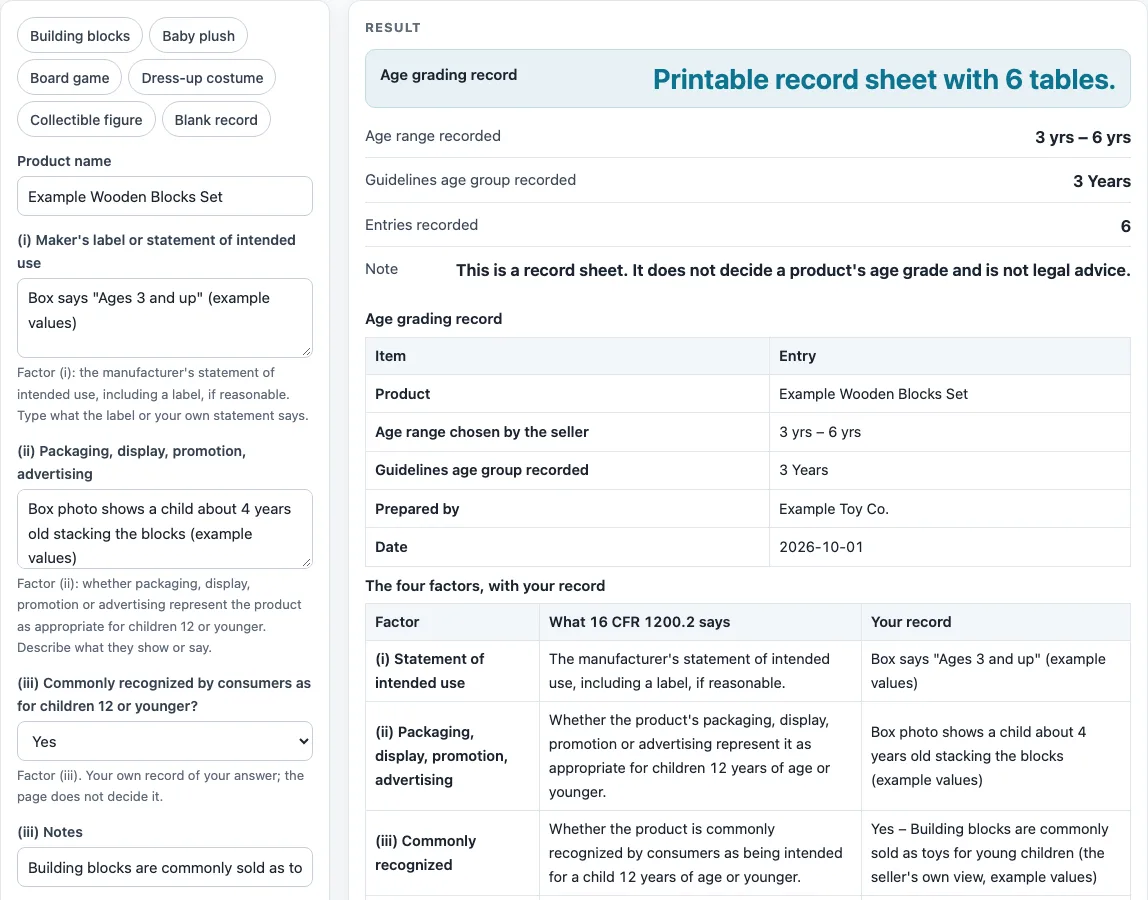
Type what the label, packaging and your reasoning say, pick the age range you chose and the guidelines age group you looked at; you get a record sheet to print or save as CSV. It records your words and grades nothing.
Recent
Your last 10 settings, saved only in this browser. Nothing is uploaded.
The Age Grading Worksheet is a free, browser-based tool for recording how you reached an age group for age grading toys, using the four factors in 16 CFR 1200.2. It runs in your browser with no sign-up, and nothing you type is uploaded.
The page builds a printable record sheet, not a decision. It repeats the words you type next to each factor and never says which age is right for your product. You enter the age range and your reasoning, and the sheet keeps them together in one place. The rule text and CPSC’s guidance, linked in the Sources table below the tool, remain the references for the rules themselves.
How to use the Age Grading Worksheet
- Type the product name in “Product name”.
- In “(i) Maker’s label or statement of intended use”, enter what the label or statement says the product is for.
- In “(ii) Packaging, display, promotion, advertising”, describe how the product is shown to buyers.
- Under “(iii) Commonly recognized by consumers as for children 12 or younger?”, choose Not recorded, Yes, No or Not sure. Add your notes in “(iii) Notes”.
- Under “(iv) Age group looked at in the CPSC guidelines”, choose one of the ten age groups. Name the subcategory or page in “(iv) Which subcategory or page”.
- Enter “Youngest age you chose” and “Oldest age you chose”, then set “Age unit” to years or months.
- Write your reasoning in “Your reasoning, in your own words”, explaining how the four factors fit together.
- If you want, open More options to add “Prepared by (optional)” and “Date (optional)”, or switch on “Show label age ranges table”.
- Read the result and any warnings. The age range prints as you typed it, for example “3 yrs – 6 yrs”.
The preset examples (Building blocks, Baby plush, Board game, Dress-up costume, Collectible figure and Blank record) fill the fields with sample entries marked (example values). Replace them with your own details before you save. “Print / save as PDF” prints the tables, and “Download as CSV (opens in Excel)” saves every table on the sheet.
What makes a product a children’s product under 16 CFR 1200.2?
The rule text defines a children’s product as “a consumer product designed or intended primarily for children 12 years of age or younger.” The four factors help show what the product was designed or intended for. The sheet quotes the rule text saying the four factors are considered together as a whole, and that the determination is made case by case.
What are the four factors in the sheet?
Factor (i) is the manufacturer’s statement of intended use, including a label, if reasonable. Factor (ii) asks whether packaging, display, promotion or advertising represent the product as appropriate for children 12 or younger. Factor (iii) asks whether the product is commonly recognized by consumers as intended for a child 12 or younger. Factor (iv) refers to the CPSC Age Determination Guidelines, current edition January 2020. Each factor has its own row for your record.
Does the manufacturer’s label decide the age group?
No. The rule text says the manufacturer’s label alone is not determinative. This is why the sheet shows a reminder when only the label is filled in. The label is one input among the four factors.
Where do the age groups in the CPSC guidelines come from?
The “Age group looked at in the CPSC guidelines” list uses the ten age groups from the user guide in the CPSC guidelines (p.13). They run from Birth Through 3 Months to 9 Through 12 Years. Choosing a group only records which group you relied on. It does not place your product in that group. The Sources table notes that the guidelines are a CPSC staff document that was not reviewed by the Commission.
How does the sheet handle the ages you enter?
Ages are typed as numbers and converted to months so they can be compared. An oldest age above 144 months (12 years) adds a warning that 16 CFR 1200.2 refers to children 12 years of age or younger. A youngest age above the oldest age is an error. With only a youngest age, the range prints as “12 yrs and up”; with only an oldest age, as “up to 8 yrs”; with neither, as a blank line.
Which age ranges appear in the choking-hazard labeling rules?
The table, shown when you switch on “Show label age ranges table”, lists the ranges named in the choking-hazard labeling rules: 3 to under 6 for small parts (1500.19(b)(1)); under 8 for latex balloons ((b)(2)); 3 or older for small balls and marbles ((b)(3)(i), (b)(4)(i)); 3 to under 8 for toys containing a small ball or marble ((b)(3)(ii), (b)(4)(ii)); and the ban on toys for children under 3 with a small-part choking hazard (1500.18(a)(9), part 1501). It is a reference only and does not say which one applies to your product.
Sources (checked 16 October 2026): ecfr.gov · cpsc.gov · ecfr.gov · cpsc.gov
Worked examples
| Input | Result |
|---|---|
| Product "Example Wooden Blocks Set" | Range 3 yrs – 6 yrs; group 3 Years |
| Product "Example Plush Rabbit" | Range 0 months – 36 months; group Birth Through 3 Months |
| Product "Example Strategy Board Game" | Range 12 yrs and up; group 9 Through 12 Years |
| Product "__________" | Range left blank; group left blank |
Calculated by the tool above; open it with the same values to see each step.
Frequently asked questions
Frequently asked questions
Does this tool decide the right age for my toy?
No. The page builds a printable record sheet, not a decision. It repeats the words you type and never grades a product or says which age is right.
What do the warnings mean?
The sheet shows a warning when no factor row has an entry, when the reasoning box is empty, and when only the label is filled in. These warnings point to gaps in your record. They do not judge your product.
What does the Blank record show?
The Blank record shows 0 entries, “left blank” and two warnings. It is a clean starting point for your own details.
What do the default values produce?
With the default values, the result shows the range “3 yrs – 6 yrs”, the group “3 Years”, 6 entries recorded and no warnings. These default values are example values, not a recommendation.
Can I save the sheet?
Yes. “Download as CSV (opens in Excel)” saves every table on the sheet. “Print / save as PDF” prints the tables.
Who issues a children’s product certificate?
This site does not test products or issue certificates. Under 16 CFR 1110.7 the certifier is the importer of record for imports or the manufacturer, or the private labeler of a privately labeled US-made product. CPSC’s children’s product certificate page says the certificate is based on test results from a third-party, CPSC-accepted laboratory.
Does the tool store what I type?
Everything runs in your browser. Nothing is uploaded, there is no sign-up, and the tool is free.
Related tools
- Children’s Product Certificates and Testing Paperwork: use when you want the overview of the certificate and testing tools on this site.
- ASTM F963 Checklist: use when you want to record the F963 sections you reviewed alongside your age notes.
- Children’s Product Certificate Generator: use when you want to lay out a children’s product certificate sheet.
- CPSIA Testing Checklist: use when you want to organise your testing notes and lab details.
- General Certificate of Conformity Generator: use when you want to lay out a general certificate of conformity for a product that is not a children’s product.
- Choking Hazard Warning Label: use when you want to lay out a choking hazard warning label.
- CPSIA Tracking Label Generator: use when you want to lay out tracking label text.